MacXTools

MSG Converter for Mac

MacXTools MSG Converter is a standalone Mac MSG converter tool that batch converts Outlook message files on macOS. It writes emails, contacts and calendar items to ten export types including PST, PDF, MBOX, VCF and ICS. None of this requires Microsoft Outlook to be present.

No registration and no upload. The Mac doing the work keeps every file. See the screens first.

  • No Outlook needed
  • Ten export types
  • Contacts to VCF
  • Runs entirely offline
Inside the file

Outlook items an MSG file carries

  • Emails
  • Contacts
  • Calendars
  • Tasks
  • Notes
  • Journals
  • Attachments
Features

Features of the Mac MSG Converter

Carries message content, item properties and attachments through to the chosen export type.

Opens MSG files for reading only

Nothing is written back into the source. The files keep their bytes and their modified dates, which a digest taken either side of the export will show.

Runs with Outlook absent

Parses the MSG structure directly. A Mac that has never had Microsoft Outlook on it converts the files the same way as one that has.

Writes contacts as VCF

A contact saved out of Outlook becomes a VCF card rather than a message body, which the Contacts app on macOS imports without further handling.

Writes calendar items as ICS

An appointment or meeting request leaves as ICS, so it opens in Calendar on macOS with its own fields rather than as text.

Rebuilds the source arrangement

Maintain Folder Hierarchy is ticked by default and reproduces the directory structure at the destination. Unticking it writes a flat result.

Lists queued messages as a tickable tree

Every file added appears in the export panel with a checkbox beside it, so part of a batch can be excluded without clearing it from the list.

Carries attachments into the output

Documents and images held against a message are written out with it rather than being discarded during the conversion.

Splits large PST output

Advance Settings holds a split size for a PST destination, which keeps each resulting data file within a workable range.

Narrows a batch by date and category

The same panel carries a date filter and a category type, both applied before the export begins rather than afterwards.

Chooses the destination explicitly

The output path is set through Change and the panel warns where the chosen volume may not hold the result.

Places no ceiling on a batch

Neither an individual message nor the length of a queue is capped. Volume affects duration alone.

Works with no network connection

Processing happens on the Mac itself from start to finish, with no data leaving the machine at any stage.

Screenshots

Mac MSG Converter screenshots

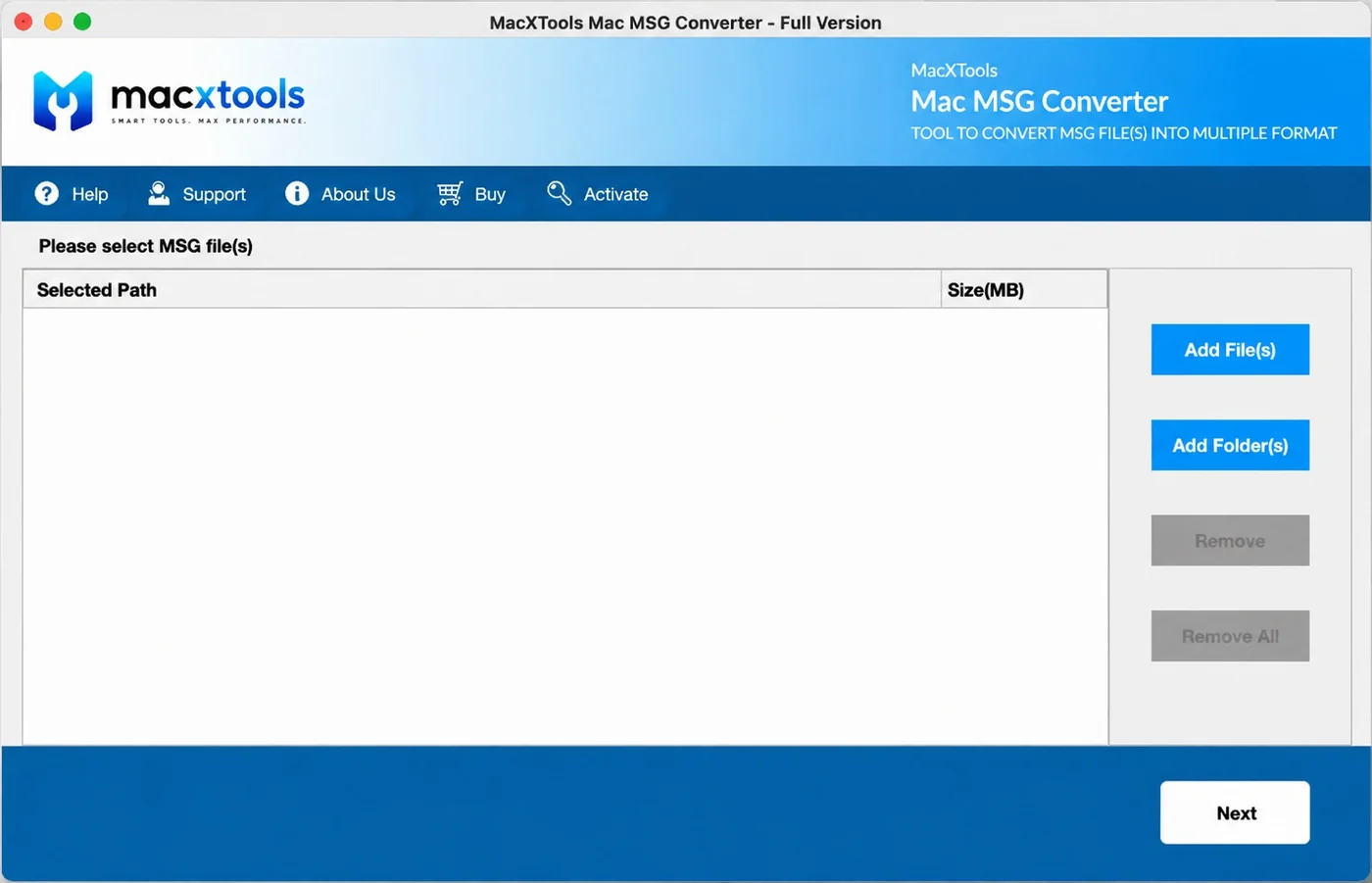
The MacXTools MSG Converter in four stages, beginning at an empty window and finishing at the export panel.

Advanced settings

Advanced settings and filters

Three panels, running from what goes into the queue through to where the finished files are placed.

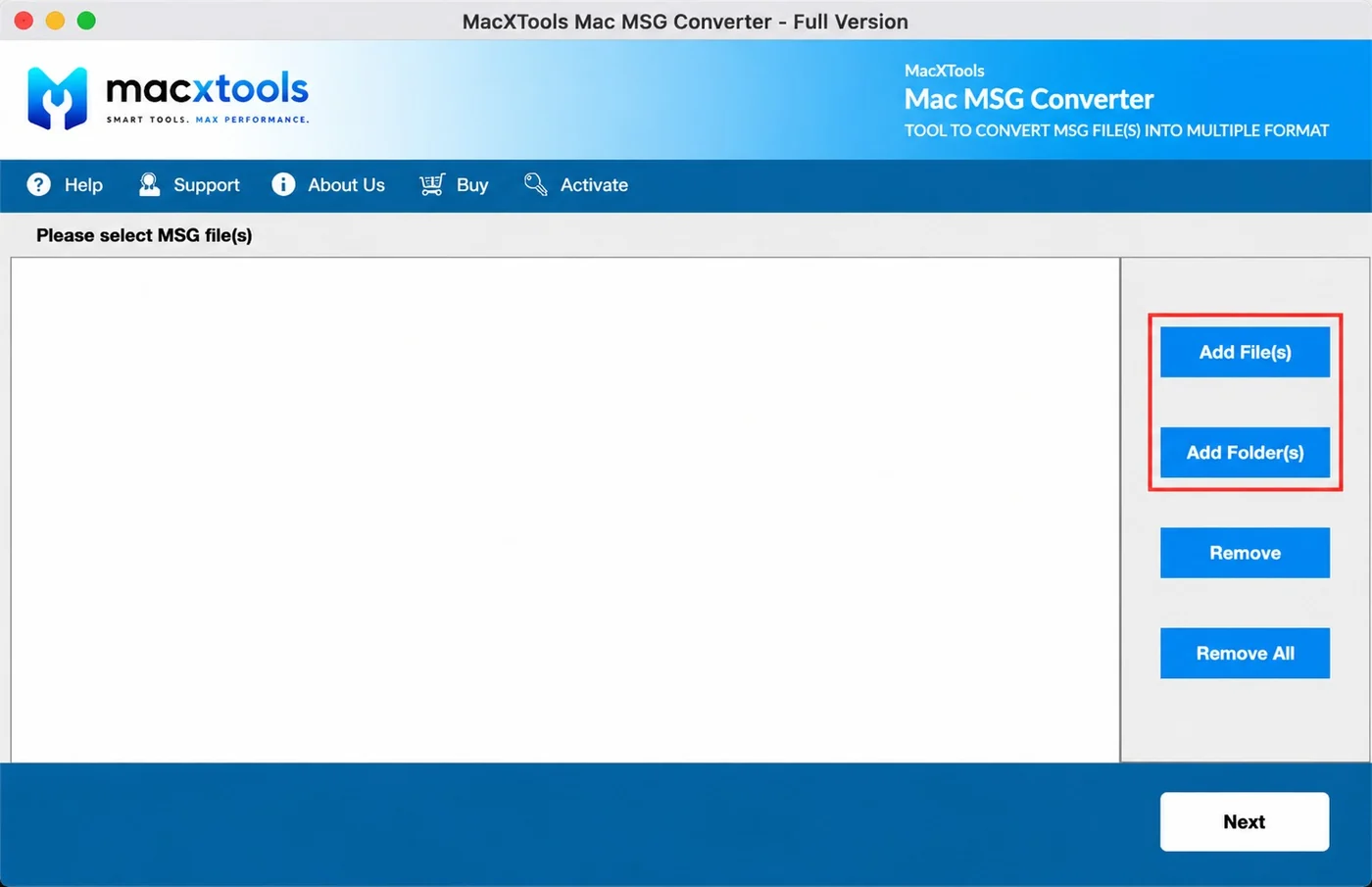
Fills the queue by message or by directory

The right hand column holds four controls. Two of them put files in, two take them out again.

  • Add File(s). Picks out individual Outlook messages one at a time.
  • Add Folder(s). Hands over a directory, from which every MSG file is drawn in together.
  • Remove and Remove All. Drop one row or wipe the queue in a single press.
  • Two columns only. Selected Path beside Size(MB), with nothing else to configure at this stage.
Add File and Add Folder buttons in the Mac MSG Converter

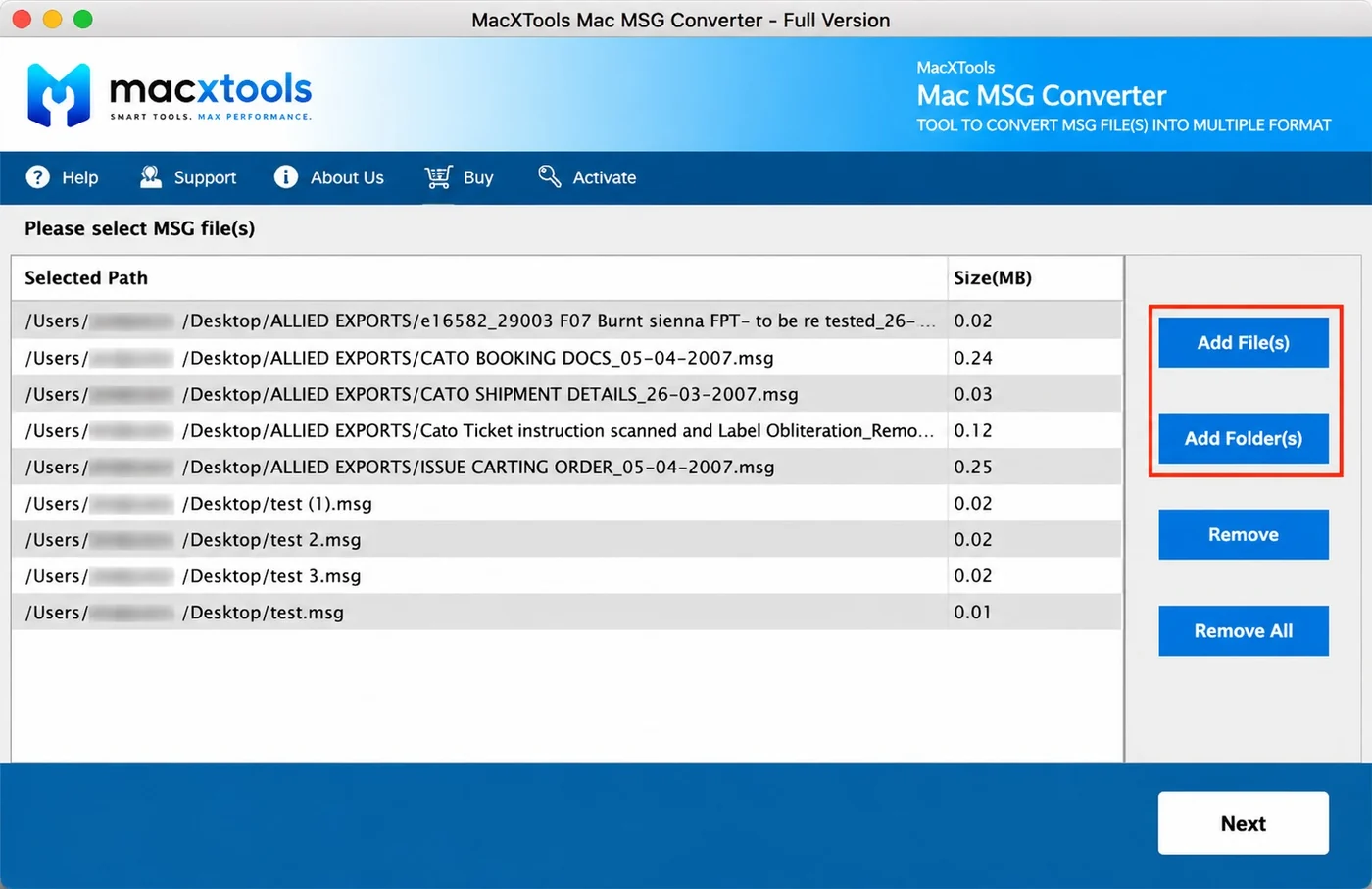
Shows what has been taken in

The table fills as files are accepted, giving a reading on the batch while there is still time to alter it.

  • Selected Path. Full paths keep messages drawn from different directories separable in one list.
  • Size(MB). A single Outlook item occupies very little space, which puts most readings in the hundredths.
  • Mixed sources. Individually chosen files and whole directories appear together in the same queue.
  • Next. Moves the queue through to the export panel once the list is correct.
Queued MSG files with their paths and sizes in the Mac MSG Converter

Chooses the output and where it goes

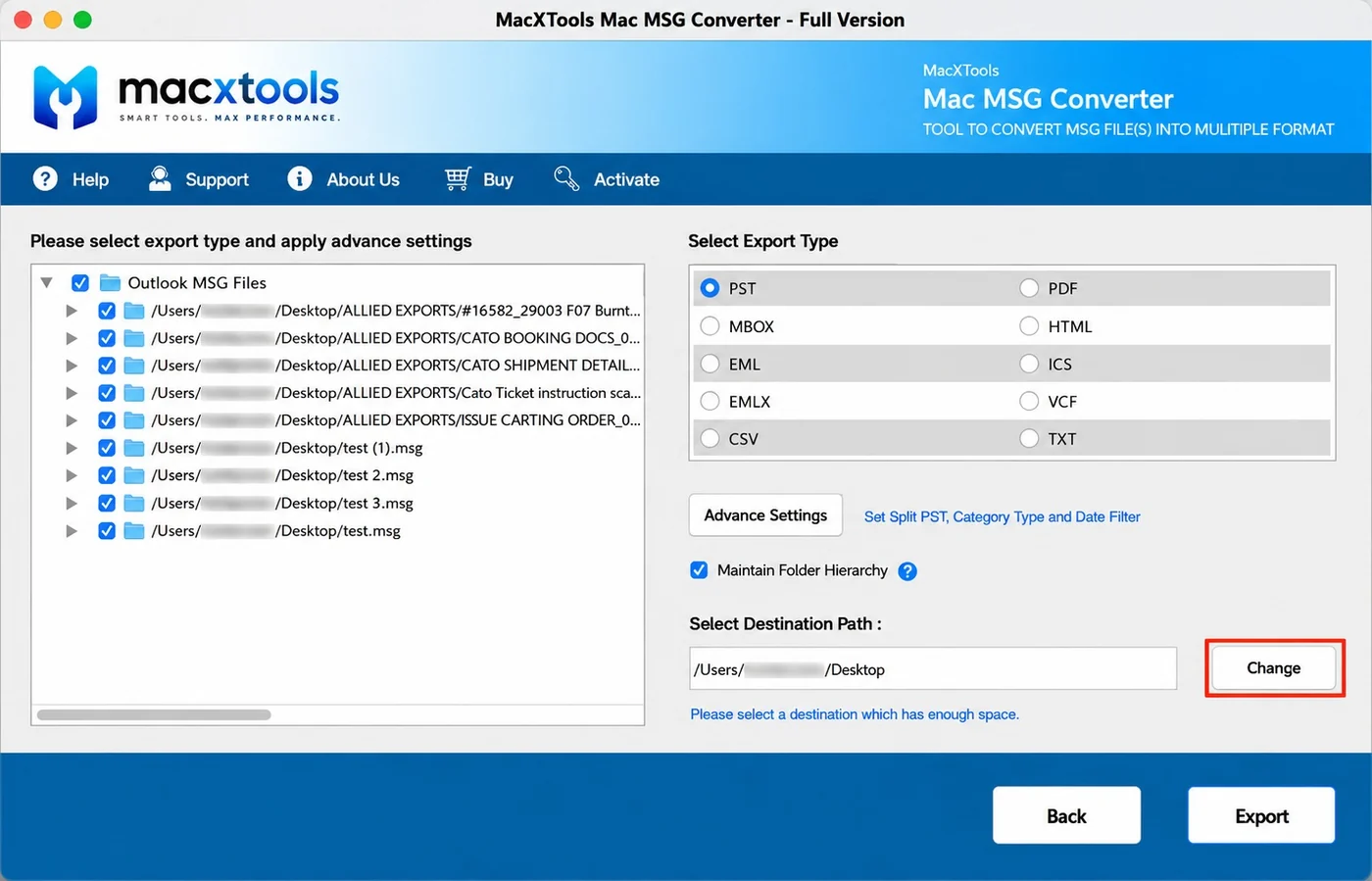
Everything remaining is decided on a single screen: what to include, what to write and where to put it.

  • Tickable tree. Outlook MSG Files heads a list where individual entries can be excluded before export.
  • Ten export types. Chosen by radio button, one per batch.
  • Advance Settings. Holds the PST split size, the category type and the date filter.
  • Destination path. Set through Change, with a reminder to pick a volume holding enough space.
Export type list and advanced settings in the Mac MSG Converter
Saving options

Mac MSG Converter saving options

One panel, ten radio buttons. Mailbox containers, single message files, readable documents and the two item formats macOS handles natively.

FormatOpened byThe case for it
PSTMicrosoft Outlook and Exchange mailboxesLoose messages have to become one Outlook data file
PDFPreview, Acrobat, any document systemMessages become paginated documents for filing, review or printing
MBOXApple Mail, Thunderbird, PostboxA folder of messages has to become one importable mailbox
HTMLAny web browserThe recipient reads the mail with no client installed and nothing to install
EMLThunderbird, eM Client, most desktop clientsOne MIME file per message, which a script or an indexer can process
ICSCalendar on macOS, Google Calendar, OutlookThe item is an appointment and belongs in a calendar rather than a mailbox
EMLXApple MailThe destination is the Apple Mail store on a Mac
VCFContacts on macOS and iOS, most vCard address booksThe item is a contact card and belongs in an address book
CSVNumbers, Excel, any importerMessage fields are wanted as rows rather than the messages themselves
TXTAny text editorPlain text is what an indexer, a script or a search tool works with
Two export types the Windows edition has and this one does not

The Windows build of this software advertises NSF and Office 365 alongside the ten above. Neither appears on the macOS export panel. NSF depends on an IBM Notes client being installed and configured. Office 365 is an upload to a live mailbox rather than a file written to disk. Reaching a Microsoft mailbox from here means exporting PST and importing that on the Microsoft side.

Users

Who uses the Mac MSG Converter tool

Six kinds of buyer, each drawn to a different corner of the export panel.

Mac owners sent MSG files

Depends on Outlook being unnecessary. A folder that arrived from a Windows colleague opens without a licence being bought or an application being installed to read it.

IT administrators

Depends on the folder route. Messages exported one at a time out of a mailbox accumulate in the hundreds. A directory of them is queued in a single action.

Legal and eDiscovery teams

Depends on the PDF output. Individual messages produced as evidence become paginated documents rather than files that need Outlook to open.

Sales and CRM owners

Depends on VCF and CSV. Contact cards saved out of Outlook import into an address book or a spreadsheet without being retyped.

Migration teams

Depends on PST and MBOX. Scattered messages are consolidated into the one container the receiving platform accepts.

Archiving and compliance

Depends on the source staying untouched. Files are read and never rewritten, so the same set can be produced again with identical bytes.

Free demo version

Each selected folder yields ten items. No export type or advanced setting is withheld. A batch that will not parse therefore reveals itself while the software is still free.

Use cases

When to use the Mac MSG Converter

Reading Outlook messages on a Mac

Converts to PDF or HTML so a message written on Windows opens on macOS. MSG is Microsoft's own single item format and nothing on a Mac reads it natively. Where Outlook for Mac keeps its own data on disk is documented in where Outlook for Mac stores its data.

Consolidating messages into a mailbox

Converts a scattered set to PST for Outlook or MBOX for Apple Mail and Thunderbird, turning individual files into one container the destination will import. How each destination stores what it imports is covered in how Mac email clients store mail on disk.

Recovering contacts and appointments

Converts contact items to VCF and calendar items to ICS. An MSG file holds whichever Outlook item was saved, so an address book saved this way is recoverable in full.

Producing messages for review

Converts to PDF for a disclosure bundle or to CSV where the fields matter more than the bodies. The source files stay unchanged throughout.

Working guide

How the Mac MSG Converter works

Add MSG files or folders

Messages go in singly through Add File or wholesale through Add Folder. The table underneath fills with paths and sizes as they are accepted. Next carries the batch to the export panel.

Choose an export type

All ten types are listed together on the export panel. The tree on the left carries a checkbox against every queued file, so part of the batch can be left out without removing it from the queue.

Apply settings and export

Advance Settings holds the PST split size, the category type and the date filter. Maintain Folder Hierarchy stays ticked to rebuild the source arrangement. Change sets the destination, then Export begins.

Specifications

Mac MSG Converter specifications

Requirements for running this MSG converter software, including the runtime it will not start without.

Name
MacXTools MSG Converter
Version
v3.2
File size
115 MB
Licence
One time purchase, no subscription
Trial limit
10 items per selected folder
Disk space
100 MB free
RAM
4 GB
Processor
Apple Silicon or Intel
Platforms
macOS 12 Monterey, 13 Ventura, 14 Sonoma and 15 Sequoia
Reads
MSG files written by Microsoft Outlook on Windows or on Mac
Prerequisite
Java JDK and JRE 8, without which the application will not launch. System region United States and language English
Installation

Installation and first run

Three known causes with a fixed answer each. None needs a support ticket.

01

The window closes straight after launch

Without Java JDK and JRE 8 present, the runtime never comes up and the window shuts again. Adding both ends the problem permanently. Macs used only for design or office work frequently carry no Java at all, which is why the message catches people out.

02

NSF or Office 365 is missing from the list

Neither is offered by the macOS build. NSF requires an IBM Notes client and Office 365 writes to a live mailbox rather than to disk, so both belong to the Windows edition. Exporting PST and importing that on the Microsoft side reaches the same destination.

03

Export finishes with fewer items than expected

Look in two places. Under Advance Settings a date filter silently drops anything falling outside its range. On the export panel itself, an entry whose checkbox has been cleared is passed over even though it still appears in the tree.

FAQ

MSG converter for Mac questions

Is Outlook needed on the Mac to convert MSG files?

No. The software parses the MSG structure itself. Outlook can be absent from the machine entirely, which is the position most Mac owners are in when a colleague sends them a folder of these files.

What are the ten export types?

PST, PDF, MBOX, HTML, EML, ICS, EMLX, VCF, CSV and TXT. All ten appear together on the export panel and any one of them can be selected for a batch.

Can contacts and calendar items be pulled out separately?

Yes. An MSG file holds whichever Outlook item was saved, not only mail. VCF is offered for contact items and ICS for calendar items, so an address book saved out of Outlook reaches the Contacts app on macOS in a format it accepts.

Is there an upper limit on batch size?

Neither the count nor the individual size is limited. Pointing Add Folder at a directory sweeps up every MSG file it holds, so a set numbering in the hundreds costs the same two clicks as a set of three.

What are the trial limits?

Ten items per selected folder. Counting happens per folder, not per batch, which means a set split across five directories yields fifty items to inspect rather than ten.

The application will not start and mentions Java. What now?

Java JDK and JRE 8 is listed as a prerequisite for this build. Where neither is installed the application cannot start the runtime and stops. Installing both clears it.

Can the original folder arrangement be kept?

Yes. The export panel carries Maintain Folder Hierarchy already ticked, which reproduces the source arrangement wherever the output goes. Clear the box and everything is written to one level.

Is there a way to exclude some messages from a batch?

Yes. Advance Settings carries a date filter alongside the category type and the PST split size, so a long set can be narrowed before the export begins.

Does converting change the MSG files?

No. Reading is the only operation performed on them. Results go wherever the Change button points, while the source files come through with their bytes and their timestamps untouched.

Will attachments survive the conversion?

Yes. Documents and images attached to a message are carried into the output rather than being dropped. The formatting around them is preserved.

Does it write into a live mailbox or only to disk?

No. Conversion ends with a file on disk. Reaching a live mailbox is a separate step you take afterwards, usually by importing the PST output on the Microsoft side or the MBOX output into Gmail or Apple Mail.

Is there a Windows version?

This page covers the macOS build. A separate Windows edition exists as its own product and carries a longer list of export types, since two of them depend on Windows software.
Download the Mac MSG Converter

Ten items per folder answer the only two questions worth asking before payment. The first is whether the MSG converter for Mac parses these particular files. The second is whether the chosen export type opens properly at the destination. The demo restricts the count and nothing else, which makes its output a fair sample of the paid one.

MSG Converter$39.00 one time · 30 day refund Buy Download trial