MacXTools

OLM Converter for Mac

The OLM converter tool exports Mac Outlook OLM file data into twelve formats on macOS. Mail, contacts, calendars, tasks and notes are exported with their headers and attachments intact. No Outlook licence is required and the source OLM is never modified.

Nothing to sign up for and nothing leaves the machine. The trial runs against a real archive before any purchase. Read the user guide.

  • No Outlook needed
  • Apple notarized
  • Never modifies the OLM
  • Runs entirely offline
Exported items

Exports every Outlook item type

  • Emails
  • Calendars
  • Contacts
  • Tasks
  • Notes
Proficient features

Features of the Mac OLM converter

Eleven things the OLM converter preserves through a conversion, from folder hierarchy to read status and attachments.

Scans the OLM before export

Loading an OLM triggers a full scan that maps every folder and item. On a large OLM the scan takes a while, so it can be skipped when the structure is already known.

Previews the archive first

The scanned OLM is browsable before conversion. Folders open for inspection and individual messages can be checked against what the archive is meant to hold.

Maintains the folder hierarchy

Inbox, Drafts, Deleted Items, Junk, Outbox and any custom or smart folders leave the OLM in the same arrangement they went in, nesting included.

Opens the OLM read only

The archive is opened read only, so headers, timestamps, read and unread status, category and priority flags stay untouched. Hashing the file before and after conversion shows it was never altered.

Exports attachments as files

Documents, images and inline graphics come out as separate openable files, rather than being flattened into a PDF page where a spreadsheet or document is no longer usable.

Exports group contacts to CSV or MSG

Distribution lists and group contacts come out to CSV or MSG alongside individual records, rather than being dropped for being awkward.

Runs without Outlook

Nothing else has to be installed for the conversion to run. No Outlook, no Office licence, no helper application and no intermediate Windows machine.

Converts fully offline

The whole conversion happens on the local machine. Nothing is uploaded, no account is created and no server sees the OLM, so the OLM converter keeps working with the network switched off.

No file size limit

A multi gigabyte OLM is handled the same way as a small one. The only cost of a large file is the time the initial scan takes.

Sets the destination folder

The destination folder is set at export time. The OLM converter defaults to a sensible location so a finished run is easy to find.

Writes a conversion report

Every OLM converter run writes a report listing item counts per folder alongside the settings used. Compared against the source tree, it verifies the conversion without opening a single message and stays as a record of what was done and when.

Advance Settings

Export controls and filters

Advance Settings holds the controls for a conversion: what is exported, the PST output split size and PDF stamping for disclosure.

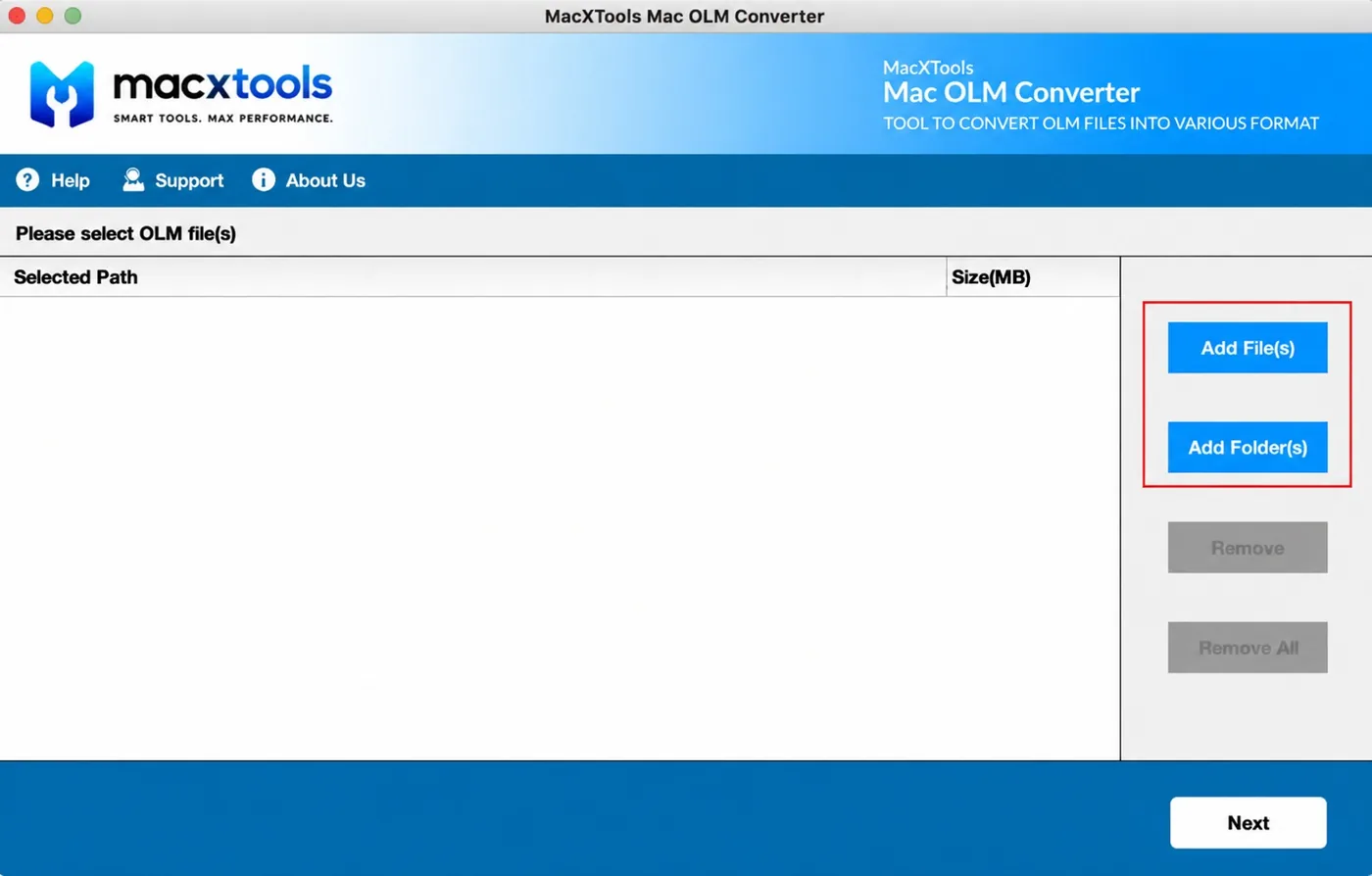
Adds OLM archives individually or by folder

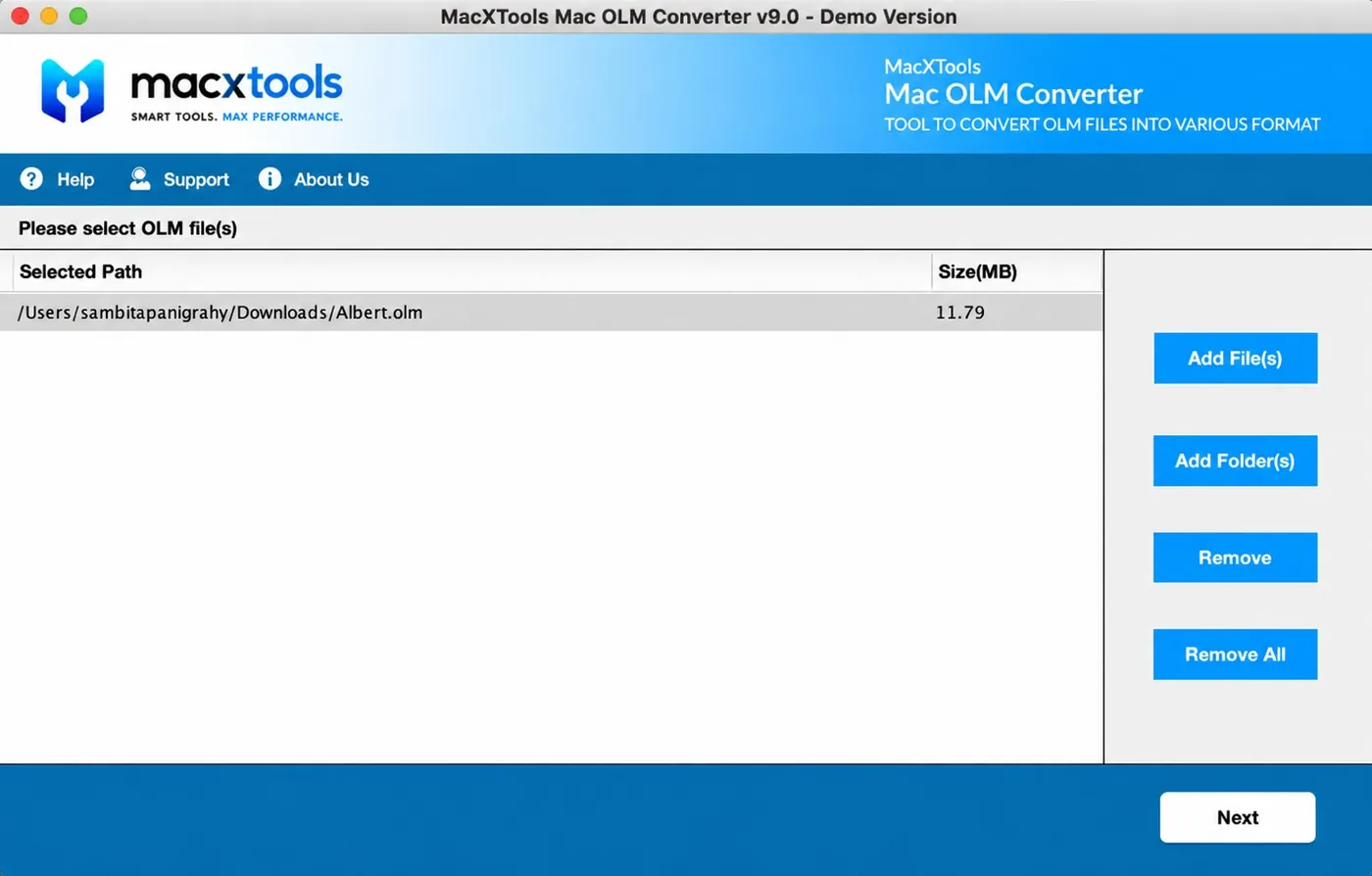
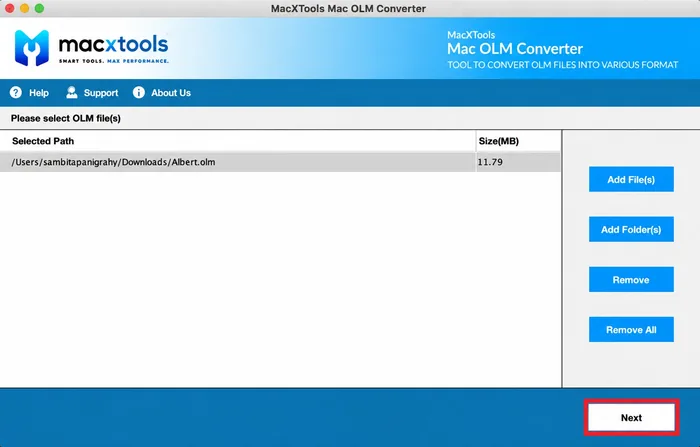
Two modes fill the queue. Everything accepted is listed with its path before any conversion starts.

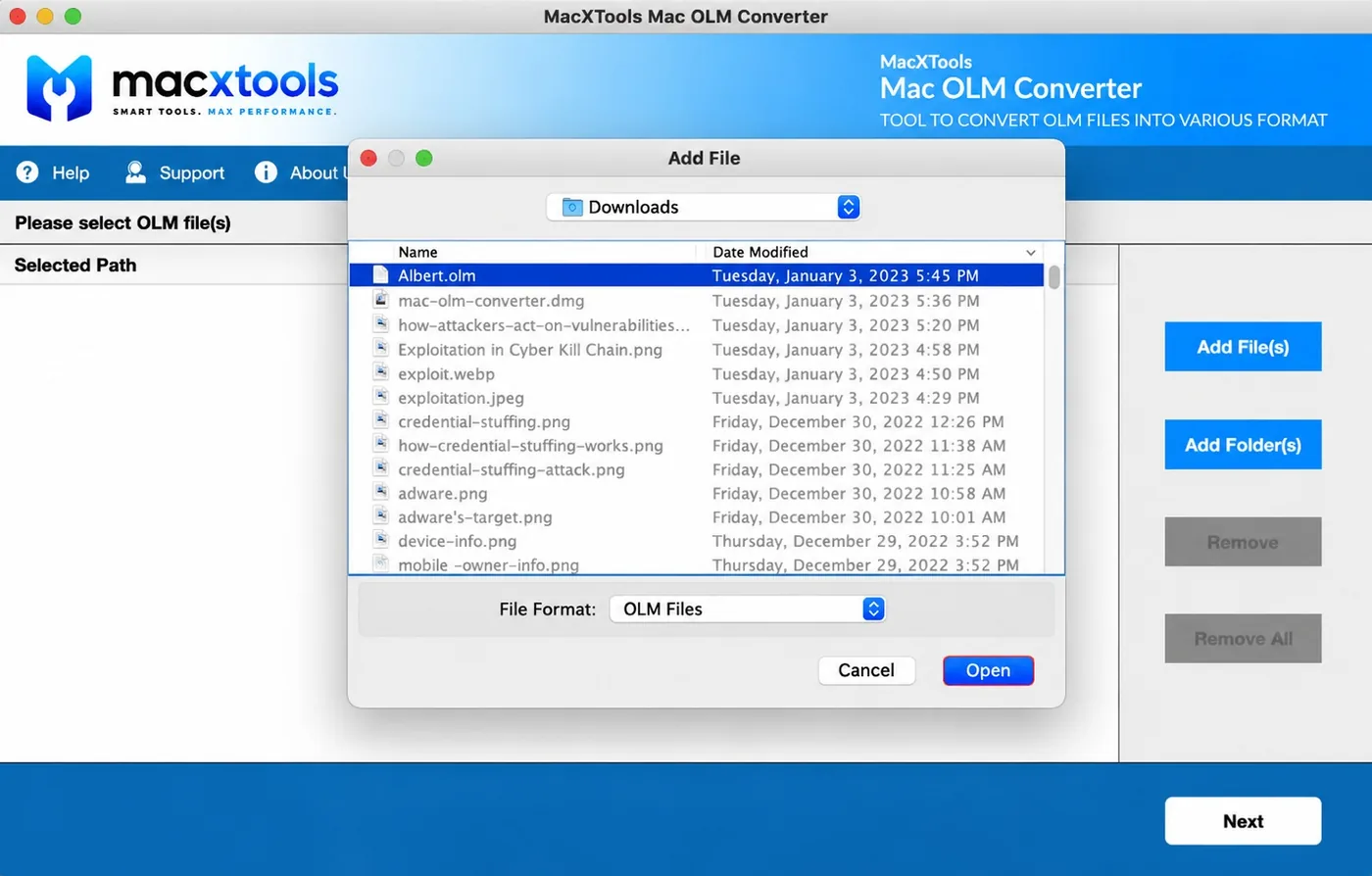
  • Add File. Takes a single OLM archive through the macOS picker, which is filtered to OLM Files so only archives are listed.
  • Add Folder. Points at a directory and queues every OLM inside it, however many there are.
  • Remove and Remove All. Clear one entry or the whole queue. Both stay inactive while the list is empty.
  • Path and size. Each queued archive is listed with its full path and its size in MB.
Add File and Add Folder buttons in the Mac OLM Converter

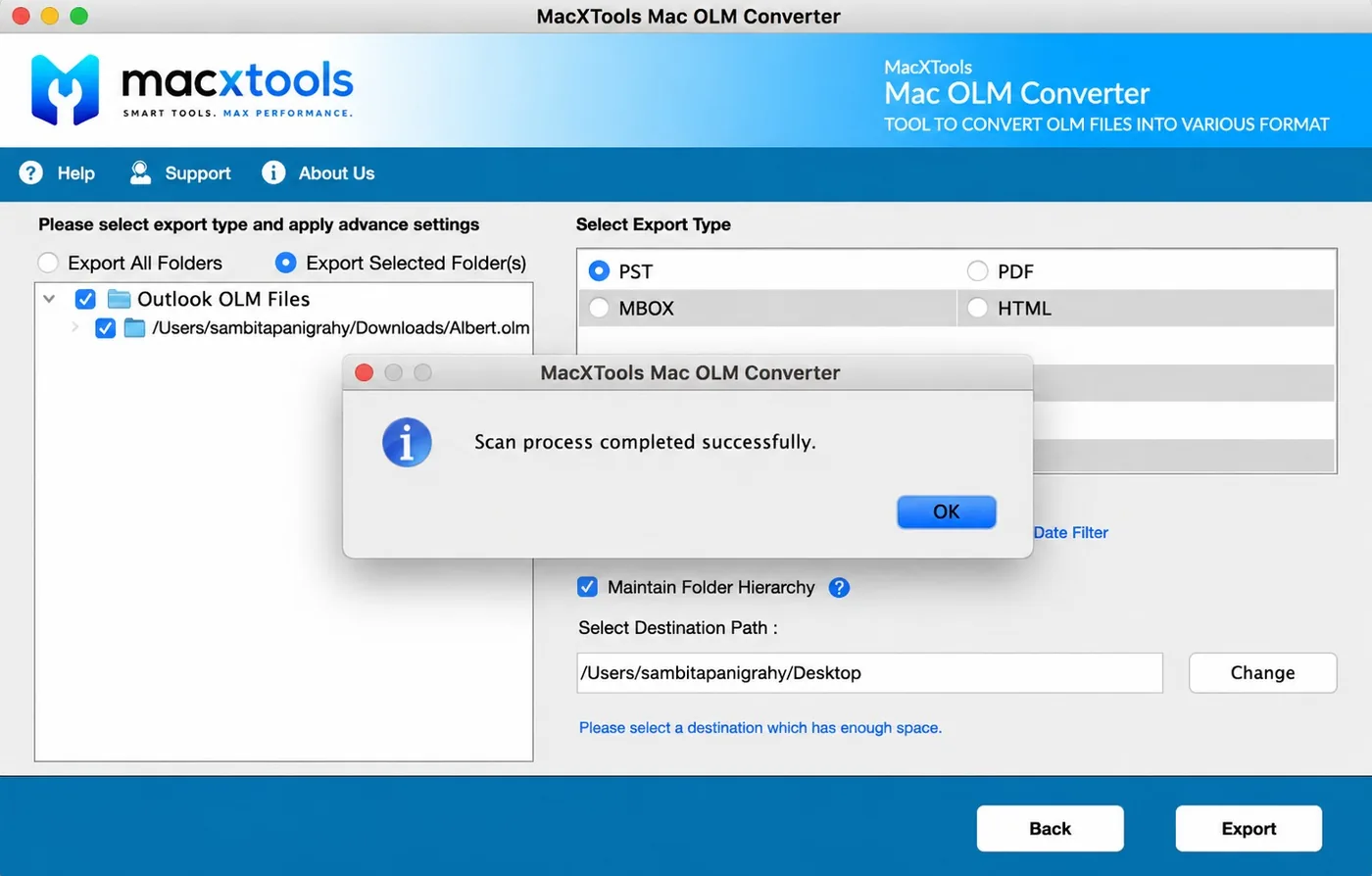
Opens the archive as a tickable folder tree

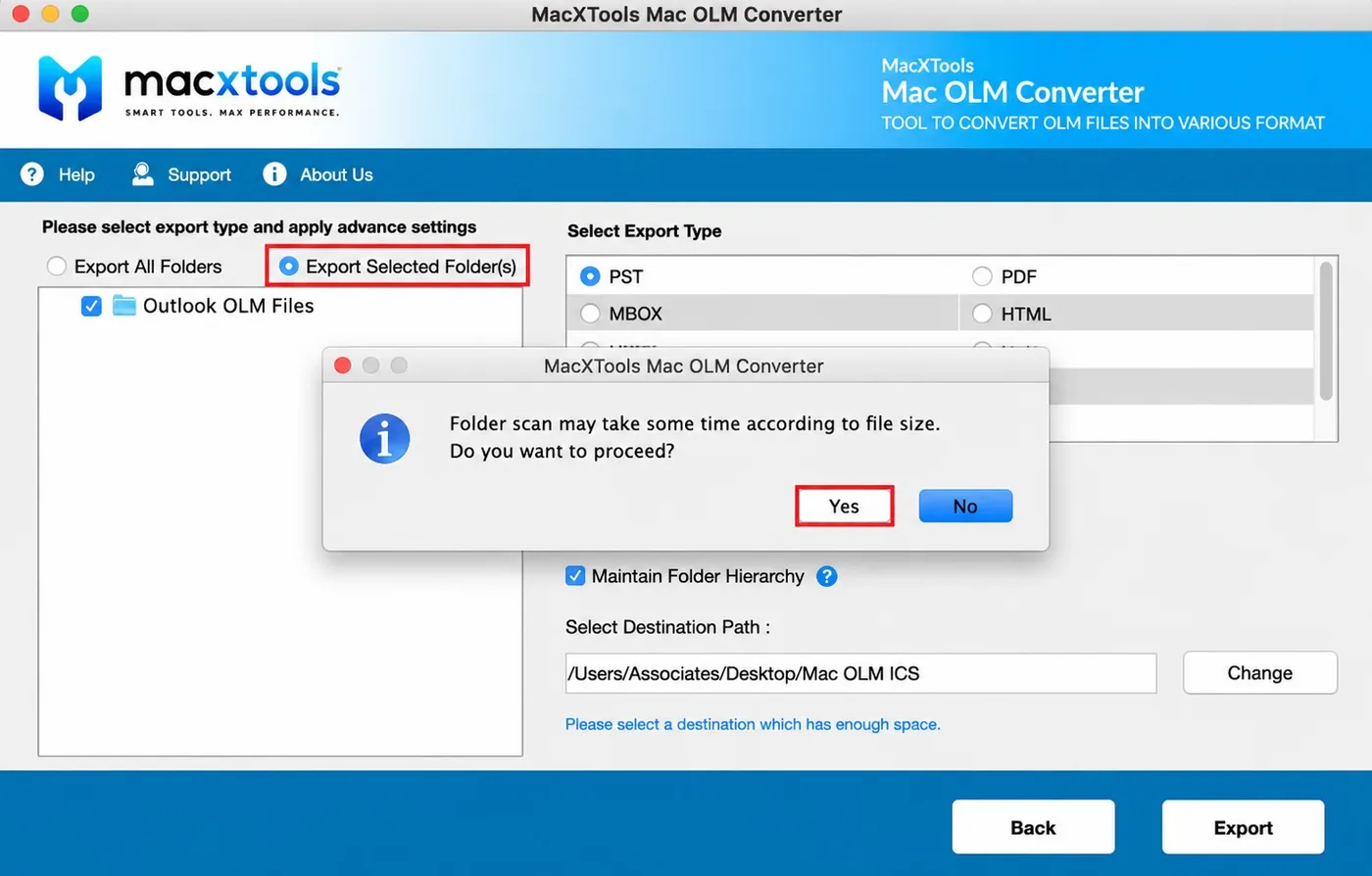
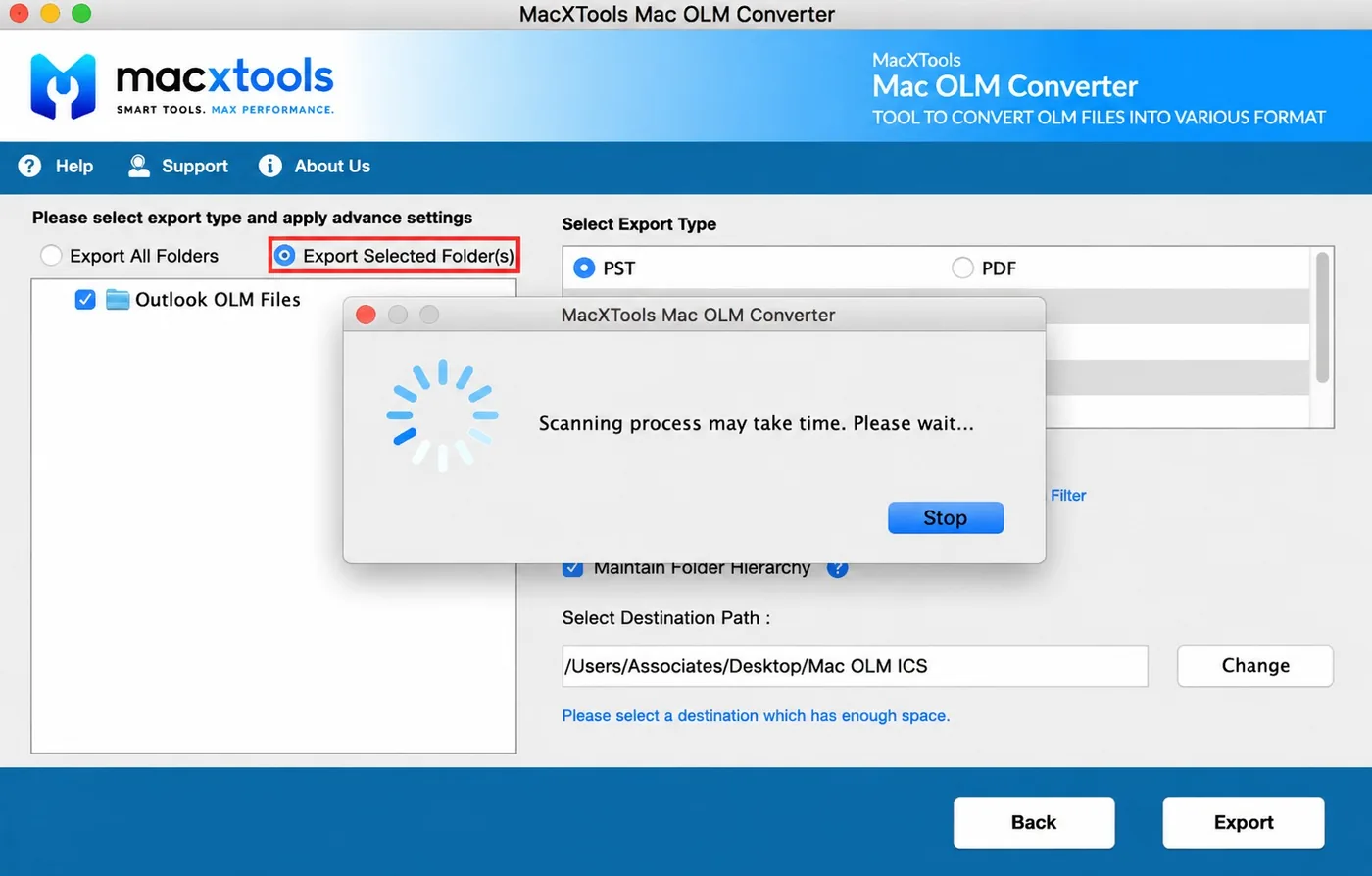
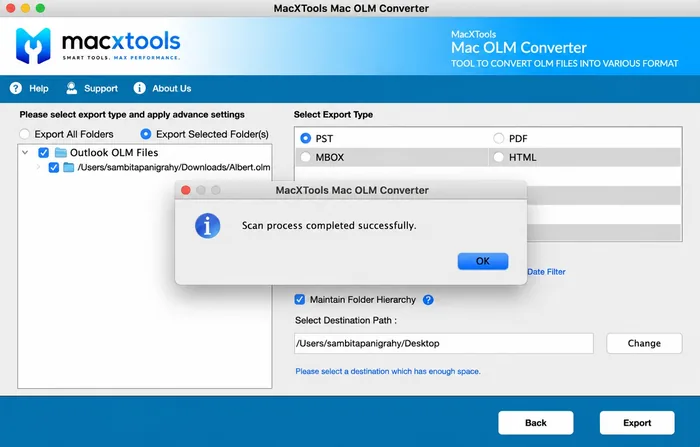
Scanning is optional. Running it opens the archive as a tree so the conversion can be limited to part of it.

  • Optional scan. Answering No goes straight through to the export settings.
  • Scan progress. A running scan reports progress and can be stopped at any point.
  • Folder tree. After the scan the archive opens as a tree of tickable folders.
  • Export All or Export Selected. Send the whole archive or limit the conversion to the folders ticked in the tree.
Scanned OLM archive shown as a tree of tickable folders

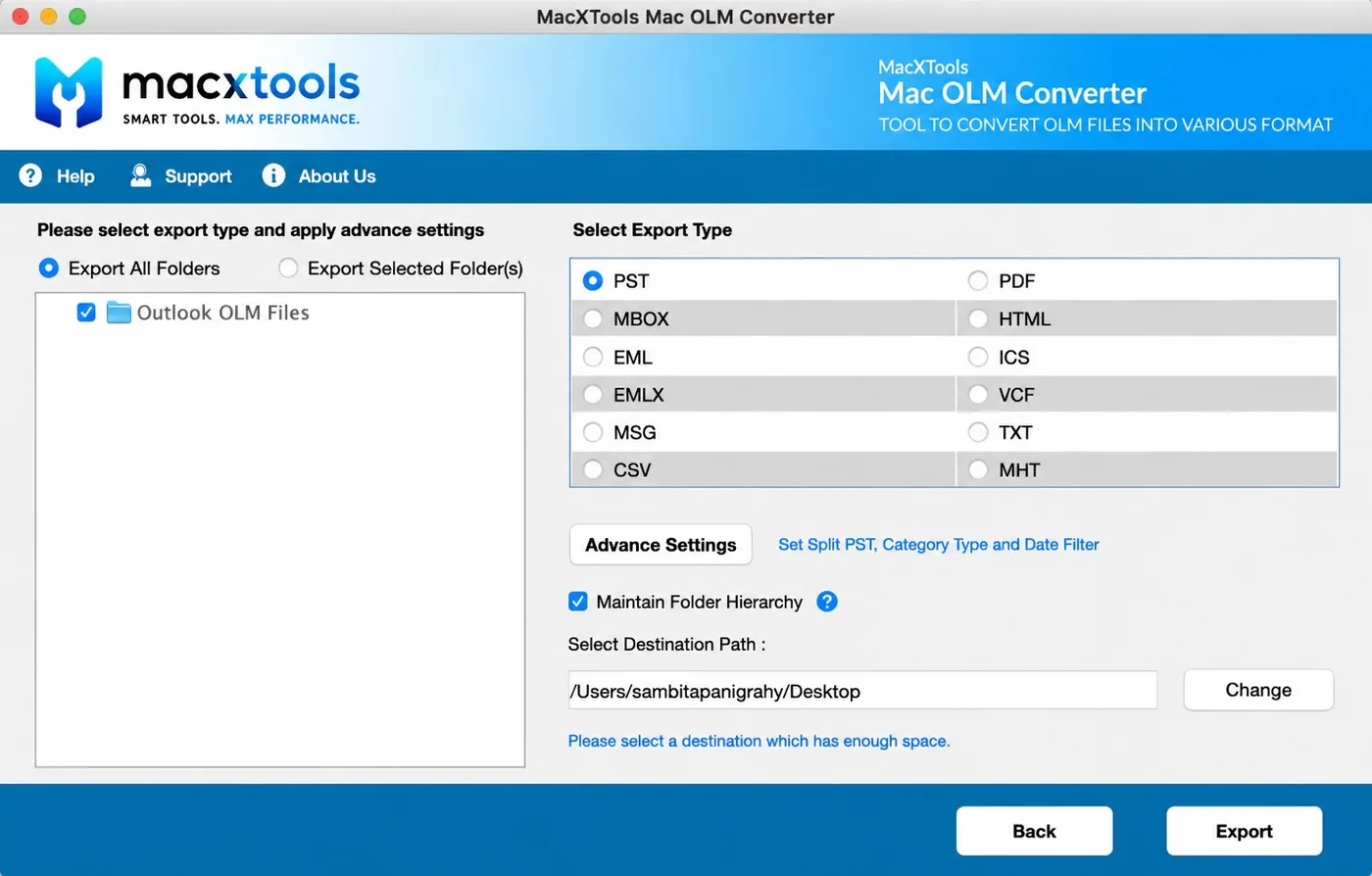
Sets the output format and the advanced settings

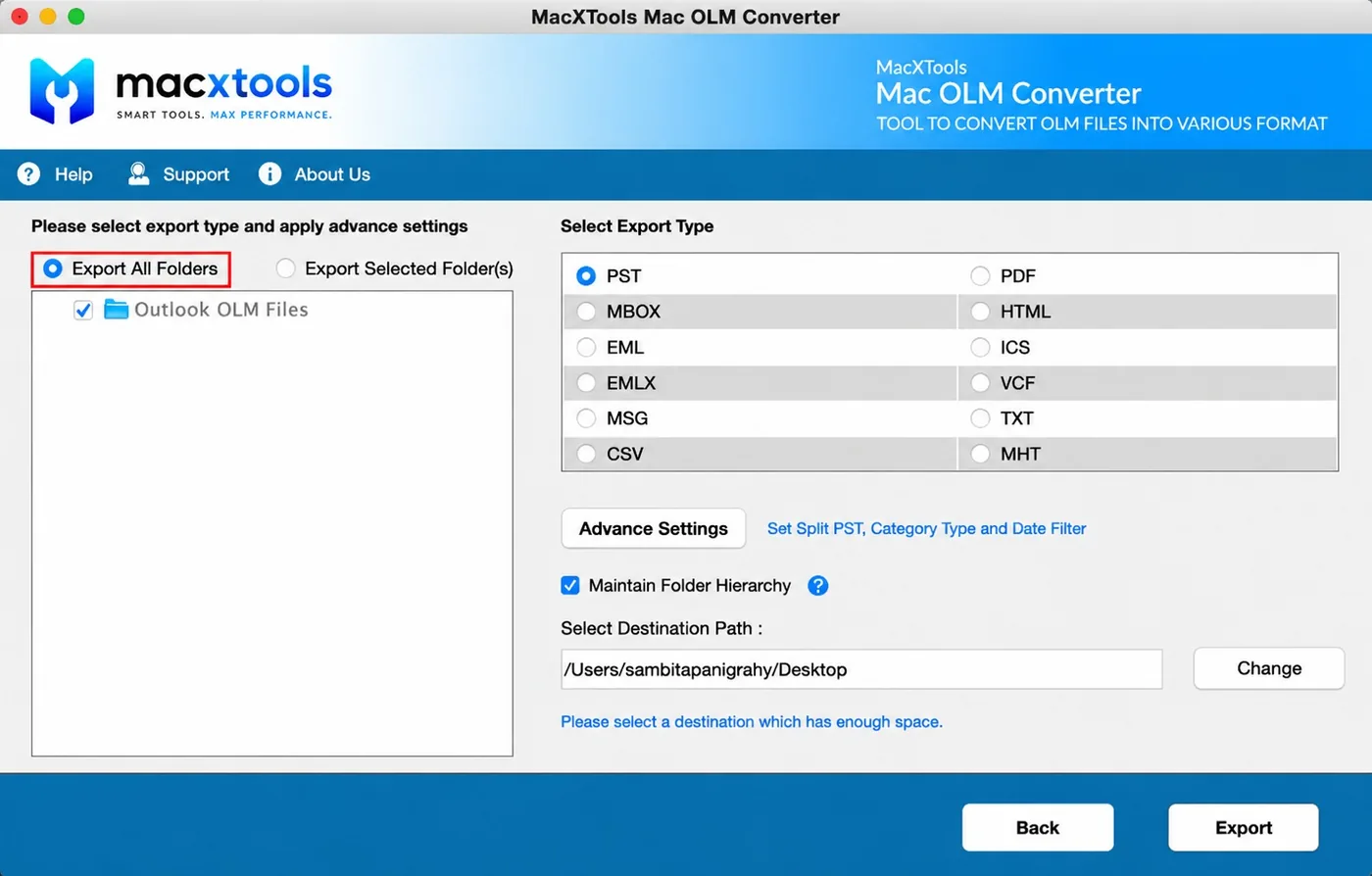
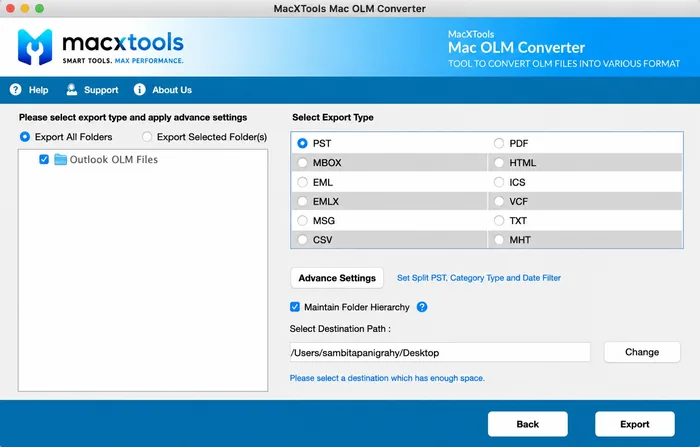
The export screen carries the format list, the advanced settings and the destination path together.

  • Twelve export types. Selected from the list on the export screen.
  • Advance Settings. Split PST, category selection and a date range, all applied before the conversion starts.
  • Destination path. Set on the same screen so the output is not written to a default location.
Export format list and advanced settings in the Mac OLM Converter
Screenshots

Screenshots of the OLM converter

Screenshots of the Mac OLM Converter, from adding a file to the final export.

Export options

Export Outlook Mac OLM file data

The OLM converter writes twelve output formats, covering mail clients, review platforms and spreadsheets.

FormatOpens inChoose it when
PSTOutlook on Windows and Exchange importThe other side runs Windows Outlook and wants a mailbox, not files
MBOXApple Mail, Postbox, Thunderbird, SeaMonkey, EntourageA move to a Mac or Linux mail client
EMLWindows Live Mail, eM Client, Zoho Mail, Roundcube, The BatOne file per message, easy to script against
EMLXApple MailDropping messages straight into a Mac Mail store
MSGOutlook on Windows and MacIndividual messages that need to stay openable in Outlook
PDFAny reader, any review platformDisclosure, archiving or anything that needs bates numbers
HTMLAny browser or text editorA readable archive that needs no mail client at all
MHTAny browserOne self contained file per message with images kept inside it
TXTAnythingPlain text extraction for indexing or search
CSVExcel, Numbers, any database importContacts that are going into a CRM or a spreadsheet
VCFAny mail client, iOS and AndroidAddress books moving to a phone or another client
ICSApple Calendar, Google Calendar, OutlookCalendar entries that need to keep their recurrence rules
Use cases

What the OLM converter is used for

Move Mac Outlook to Windows Outlook

Outlook on Windows will not import an OLM. It reads PST. No setting in either application bridges the two, so the archive has to be converted before a handover to Windows is possible. The October 2026 deadline behind many of these conversions is set out in legacy Outlook for Mac end of support.

Read an archive without Outlook

An OLM from a machine that is no longer available stays unreadable until it is converted. So does one written under a lapsed licence. The OLM converter opens it again without any Microsoft software installed. The structure of the format is covered in what an OLM file is and why almost nothing opens it.

Produce readable mail for disclosure

Disclosure, an audit or an internal investigation means handing over readable copies with the metadata attached. A paginated PDF with bates numbering is usually what the requesting side has specified. An eDiscovery team will expect the chain of custody to hold up alongside it.

Switch to Apple Mail, Thunderbird or Postbox

Apple Mail, Thunderbird and Postbox all read MBOX, so that format is the route into any of them. For a webmail account the usual path is MBOX first then an import on that side.

Where the OLM actually is

An OLM is not kept on disk by Outlook for Mac by default. It exists only after File then Export was run, saved wherever it was chosen at the time, usually the Desktop or Documents. A search for the .olm extension in Finder locates it on the volume. The live mail database is separate and is held inside Group Containers in the Library, which the converter does not read.

Conversion steps

Convert an OLM file in three steps

Add the archive

Add File takes a single OLM. Add Folder takes a directory and queues every OLM it finds. Each file is listed with its path and its size. A scan prompt follows: accepting it builds the browsable tree the next step uses, declining it goes straight through.

Batch queue in the Mac OLM Converter with the added archive listed before the next step

Choose what to export

Export All Folders sends the whole archive. Export Selected Folders opens the tree for ticking individual folders. Advance Settings stands alongside both and holds the split size for PST output, the category types to include and the date range.

Scan complete folder tree in the OLM converter tool with individual folders ticked for export

Select the format and export

One of the twelve export types is selected, Maintain Folder Hierarchy stays ticked unless the output should be flattened, then the destination path is set. Export starts from there. The completion report verifies the output against the source.

Export formats and destination path in the Mac OLM Converter before conversion starts
Specifications

System requirements

What the Mac OLM Converter needs on the machine before installation. Below that is what the OLM converter reads once installed.

Name
MacXTools OLM Converter
Version
v9.3
File size
149 MB
Licence
One time purchase, no subscription
Trial limit
100 emails per OLM file, plus 25 contacts, calendars, tasks and notes each
Disk space
100 MB free
RAM
4 GB
Processor
Apple Silicon or Intel
Platforms
macOS 12 Monterey up to macOS 15 Sequoia. Apple notarized, so Gatekeeper raises no warning
Reads
OLM written by Outlook for Mac 2011, Outlook for Mac 2016 and Outlook for Mac 2019
Prerequisite
System region United States and language English. This affects only how the app parses dates, not where it runs
Common questions

Frequently asked questions

Do I need Outlook for Mac installed to use this?

No. Nothing from Microsoft has to be on the machine, neither the application nor a licence for it. The Mac OLM converter runs standalone.

What can I do before I pay?

The trial loads an OLM, browses it and exports a sample of the file data, which shows whether the output is correct before any purchase.

Is there a file size limit?

None. Size only affects how long the opening scan takes. The scan can be skipped and no file size ceiling applies.

Does it modify my OLM file?

No. The converter reads the container without writing a byte back. The result goes to a separate destination folder. A hash taken before and after conversion matches, which is the evidence a reviewer asks for.

Can I convert several OLM files at once?

Yes. Batch mode queues every OLM in a directory and converts them in a single run, which suits a whole team moving at once.

Can I export only part of an archive?

Yes. Three controls stack: individual folders in the preview, a From and To date range and a restriction to particular item types.

What happens to attachments, contacts and calendars?

They stay separate. Attachments are written as openable files, address books become VCF or CSV and appointments become ICS with their recurrence rules intact.

Should I convert on the Mac or copy the OLM to a Windows PC first?

Convert on the Mac. Moving a large OLM across a network or onto a USB stick is where files get truncated. A half copied OLM fails to open at the other end. Converting it where it was written and sending the output avoids that.

Is there a Windows build of this?

No. This build runs on macOS only. An archive already on a Windows machine is better handled by a Windows side tool, since moving it back to a Mac to convert adds nothing.

Which Outlook for Mac versions does it read?

Every release from Outlook for Mac 2011 onward writes the same container, including the 2016 and 2019 builds. Later versions have not changed it in a way that matters, so age of the archive makes no practical difference.

Convert an OLM file now

A hundred emails per OLM file is enough to confirm the archive is intact and the output is correct. A file that turns out to be damaged rather than unreadable is identified at no cost.

OLM Converter$39.00 one time · 30 day refund Buy Download trial