Experts rated PST converter software to convert Outlook PST file into 11 popular formats in just a few clicks. It allows users to convert emails, contacts, calendars, tasks, notes and journals of any Outlook PST file. No Microsoft Outlook installation required and original PST file stays safe.
No registration and no upload. The source file stays on the local disk. See the screens first.
No Outlook needed
No Windows machine
Apple notarized
Runs entirely offline
Inside the File
Mac PST Converter Supports All Item Types
Emails
Calendars
Contacts
Tasks
Notes
Journals
One thing this build will not do
It reads healthy PST files. If Outlook itself already refuses to open the file, no converter will get past that and this one does not claim to. Repair comes first and conversion second, which is work for Mac Outlook Recovery rather than this tool. Corrupt file support is commonly a Windows side feature listed on a Mac page, so it is worth confirming before buying anything for a Mac.
Screenshots
Mac PST Converter Working Steps
Steps to convert multiple PST files on Mac OS using the MacXTools PST converter software.
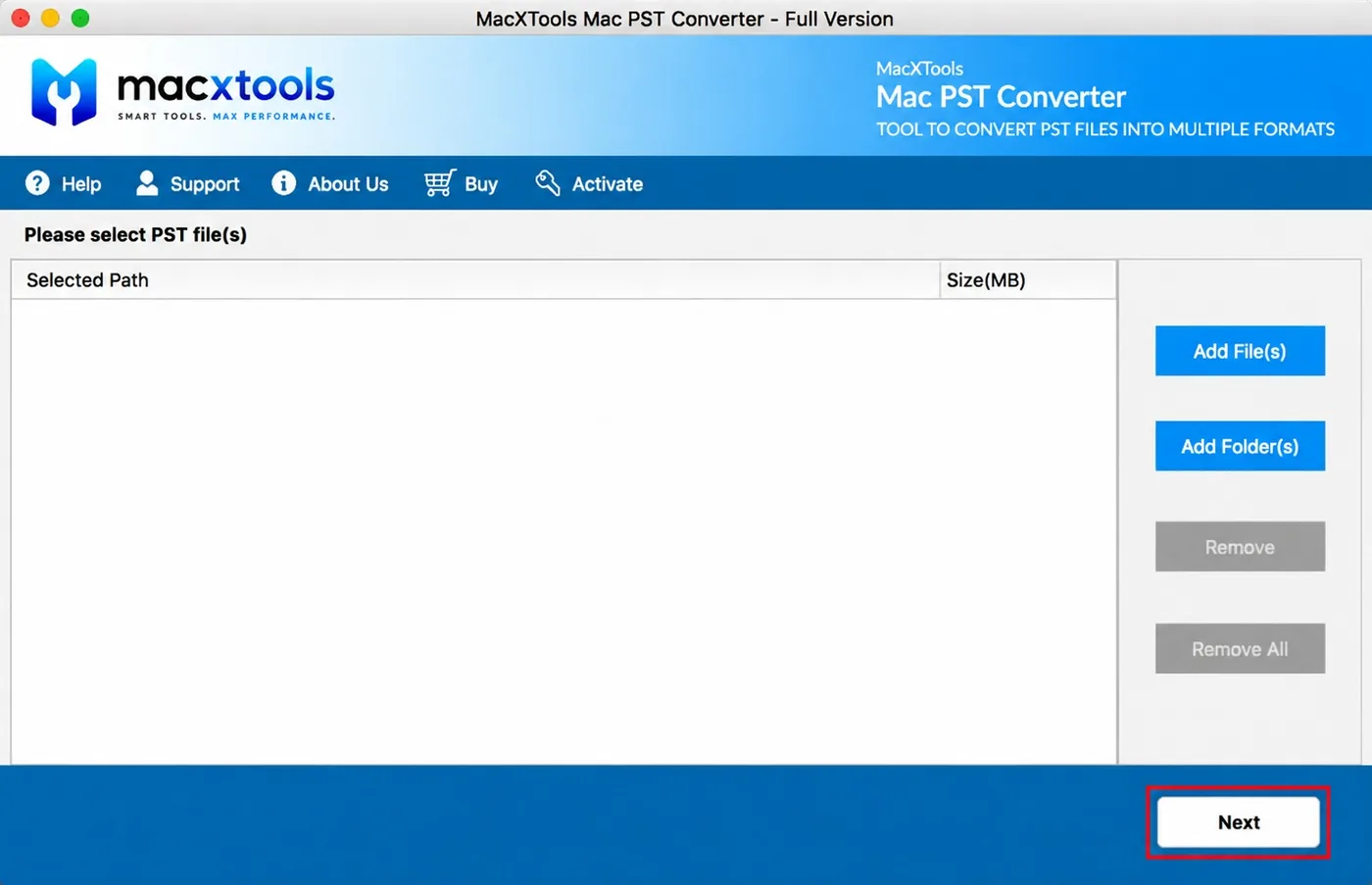
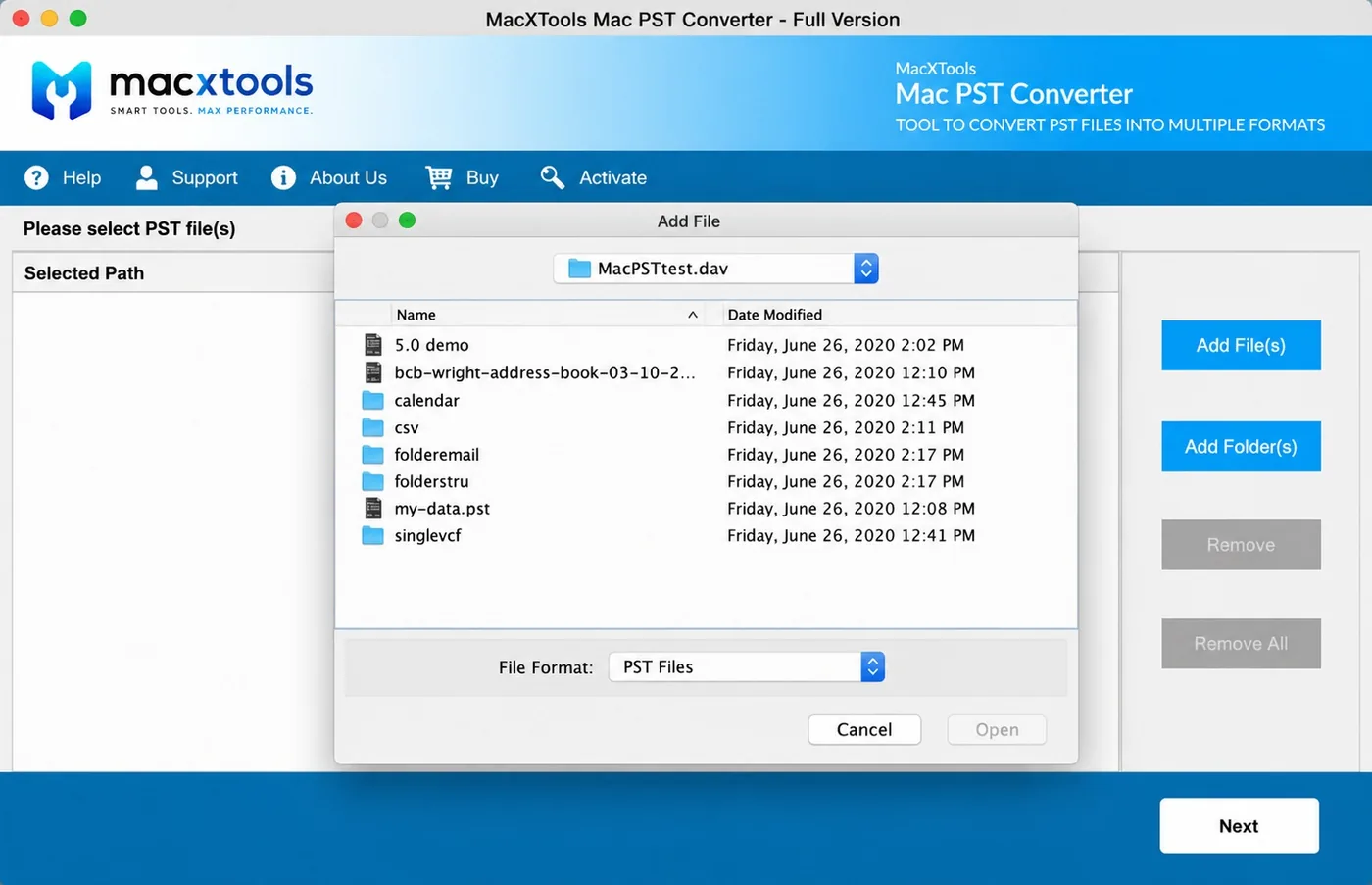
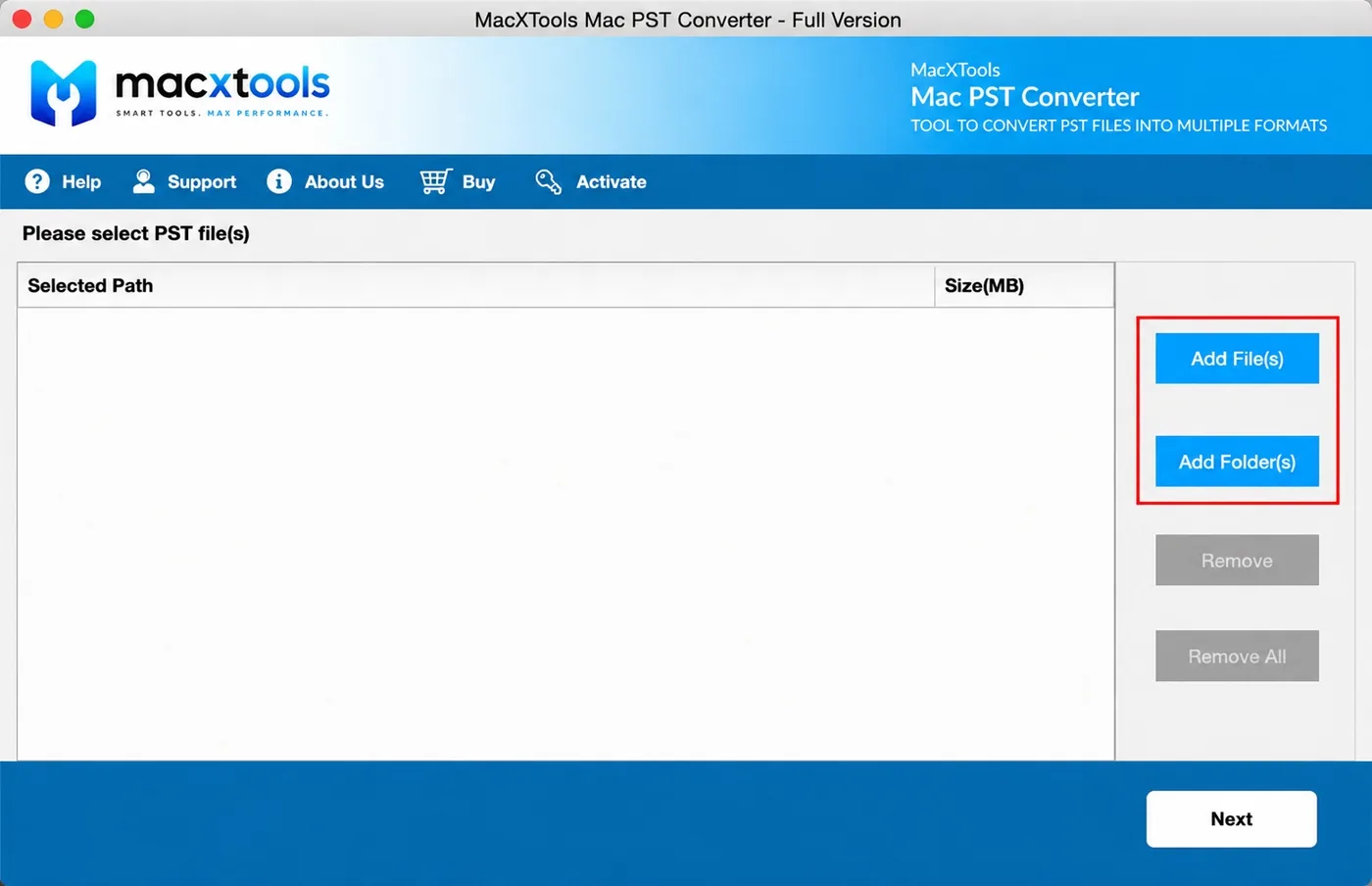
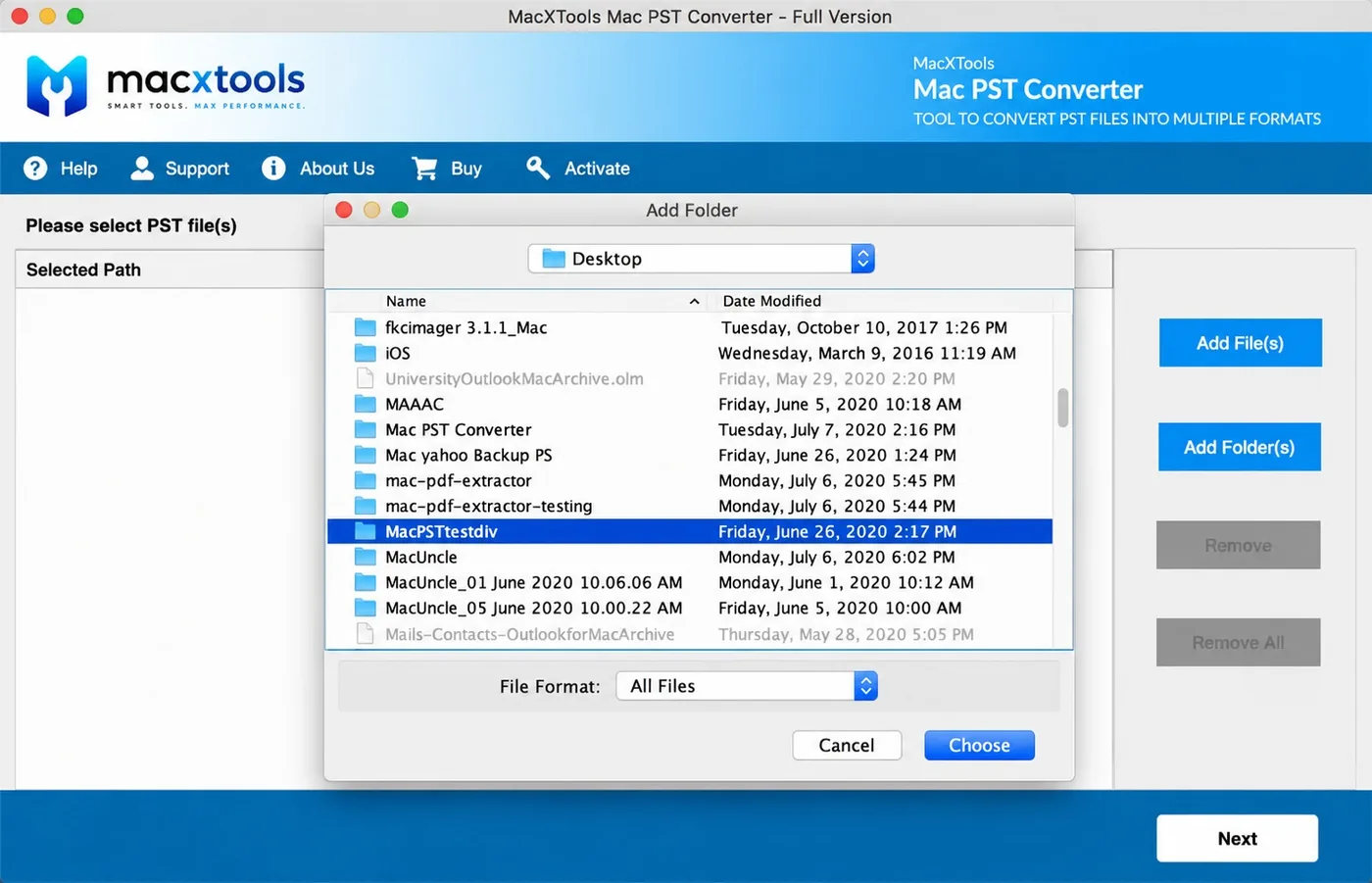
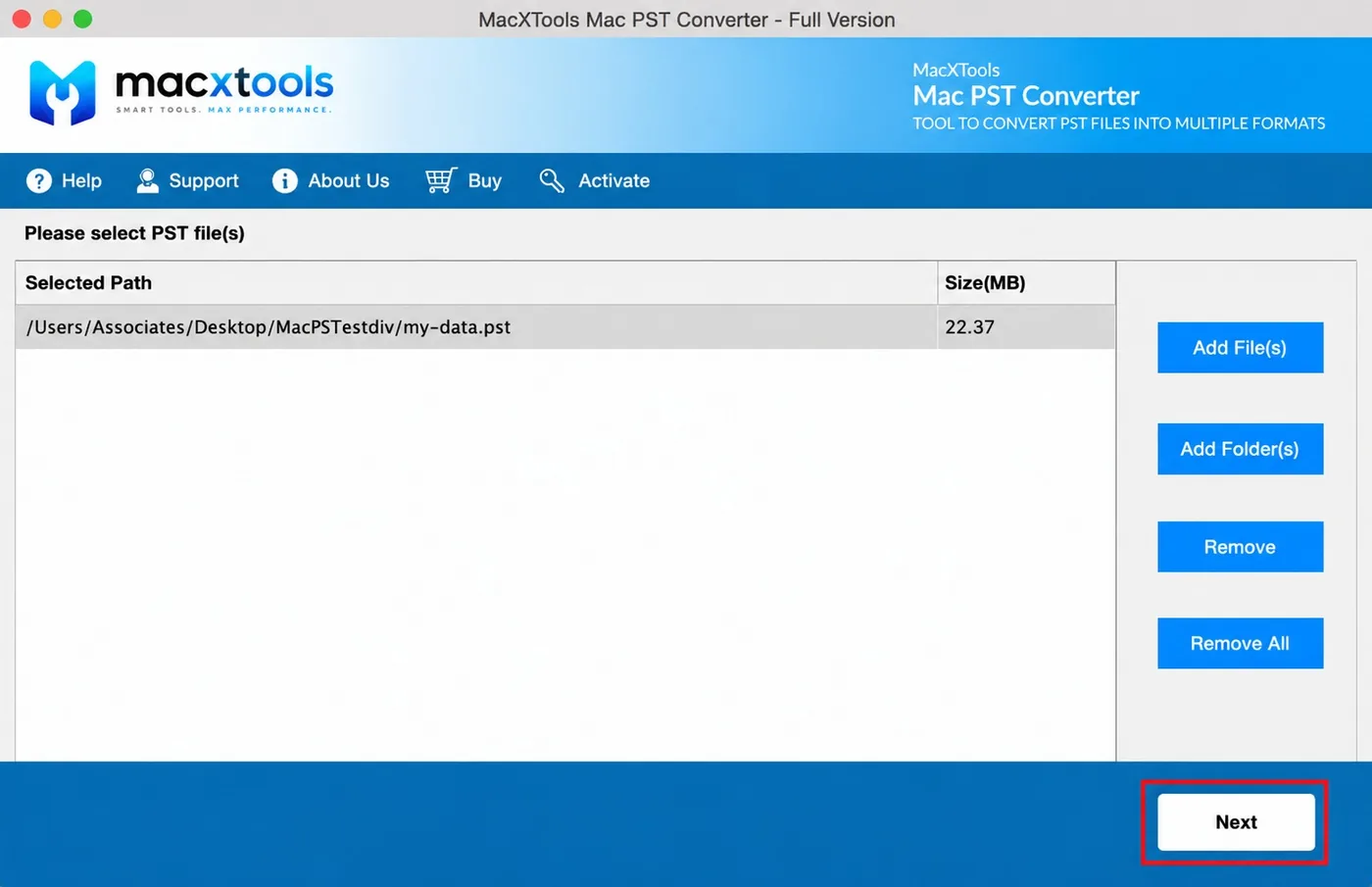
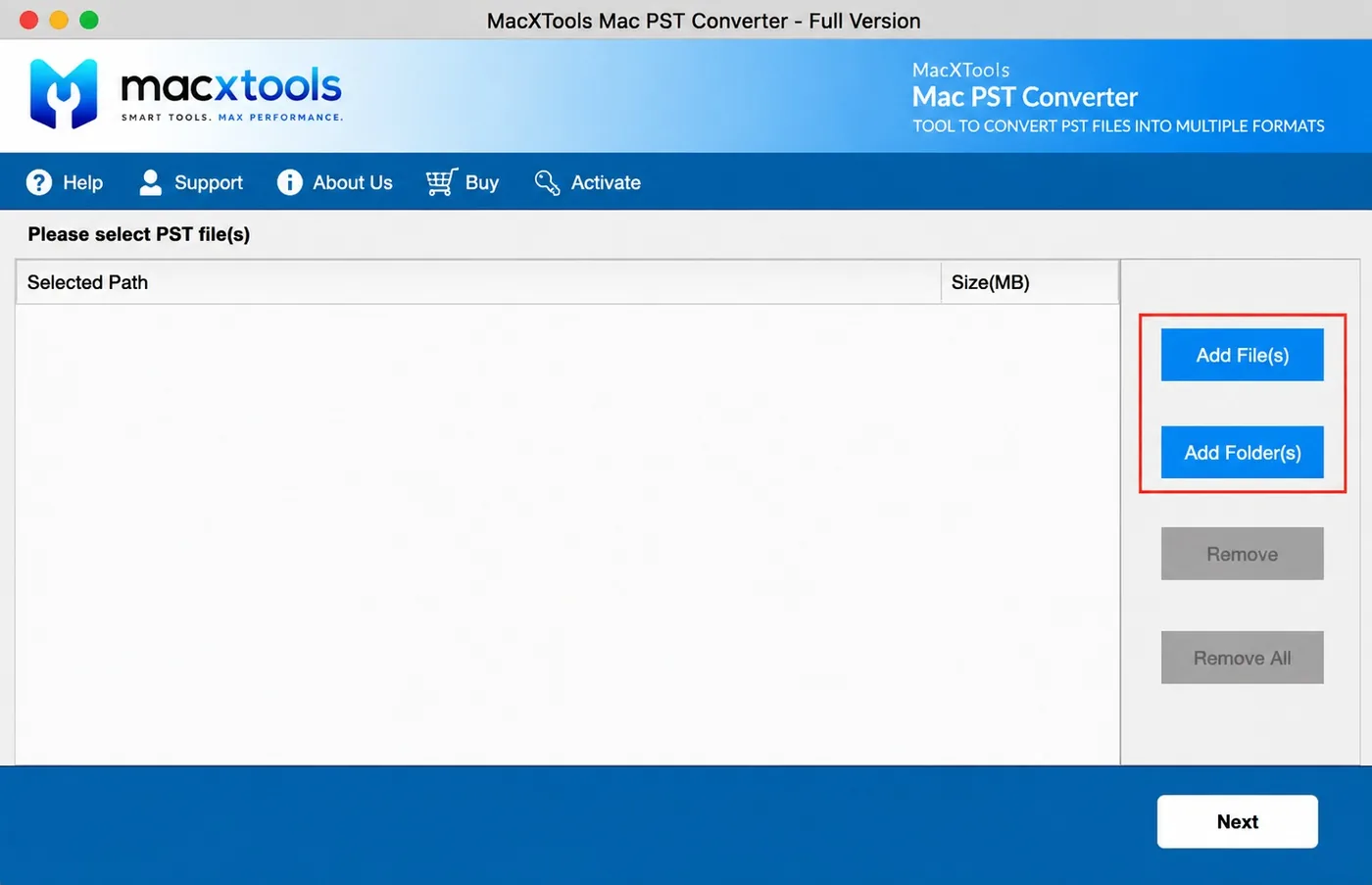
Step-1 The window opens on Please select PST file(s) with an empty list. Selected Path and Size(MB) are the only two columns, because at this stage the only question is which archive is going in.Step-2Add File(s) takes a single archive. Add Folder(s) takes a directory and queues every PST inside it. Remove and Remove All stay below, greyed out until there is something to clear.Step-3 Choosing Add File(s) opens a picker with File Format set to PST Files. Folders stay browsable so users pick the PST file from inside them, which stops the wrong extension loading by mistake.Step-4 Both add buttons stay available while the list is still empty, so either route can be taken first. Nothing below them is clickable yet, because there is nothing loaded to remove.Step-5 Choosing Add Folder(s) shows All Files instead, because the selection is a directory rather than the archive itself. PST converter collects everything carrying a PST extension inside it.Step-6 Mac PST converter lists every entry with its full path and a size in megabytes. A 22 MB archive and a 22 GB archive look identical in Finder. Here they do not, which is the difference between five minutes and an afternoon.
Features
Features of Mac PST Converter
Mac PST file converter preserves email content, folder structure and meta properties throughout the PST conversion process.
Parse PST in Read Only Mode
PST converter perform all operation in read only mode to maintain the original file. Metadata survives untouched, from headers and timestamps through to read status, priority flags and categories.
Maintains Folder Hierarchy
Mac PST converter is capable to manage folder order of the source file at the destination. Maintain Folder Hierarchy rebuilds Inbox, Sent Items, Deleted Items and every custom folder exactly as Outlook had them.
Save PST Files with All Attachments
The software is capable to manage embedded attachments in their native formats. Four attachment placements are on offer when the destination is PDF and the reviewer wants them inline.
Keeps Group Contacts Intact
Distribution lists export as groups to PDF, HTML, CSV, MSG or TXT rather than being broken into individual records, which is a common casualty when an address book moves.
Carries Recurrence Rules Over
A weekly meeting stays a weekly meeting. Recurring calendar entries and recurring tasks both keep their pattern rather than arriving as a single orphaned instance.
Selectable vCard Version
Three versions of the vCard format are available for contact output. The receiving system usually dictates which one. Getting it wrong is why an import can silently drop fields it does not recognise.
Writes a CSV Conversion Report
Each transfer leaves behind a CSV report listing where the data came from, where it went, how many items succeeded and how many did not. That file is the record of what the conversion moved.
No PST File Size Limitation
PST file converter tool does not impose any file size limitation for conversion. A multi gigabyte PST file simply takes longer to index before the tree becomes browsable.
Convert PST without Any Email Client
PST converter is a standalone software for convert Outlook PST files. It is a self-processing utility, so Outlook, Office and any helper application can be absent from the Mac entirely.
100% Secure Offline Conversion
The whole conversion process happens on the local machine. It ensures data security and integrity, with no upload, no account and no server involved at any point.
5+ Naming Convention Options
PST converter software offers a naming convention feature to save converted emails in the desired way. Subject, Subject+Date, sender and auto increment are among the options available.
Full Headers When Required
Internet headers can be written into the output alongside the visible fields. Anyone examining provenance will ask for it. Adding it afterwards is not possible.
Advance Settings
Controls & Filters in PST Converter
Mac PST converter software allows users to customise the output file as per requirements.
Browse PST Files into Software Interface
PST converter software offers two options to browse Outlook PST files into the interface. Nothing below them is clickable until the list holds an entry.
Add File(s). Takes a single archive.
Add Folder(s). Takes a directory and queues every PST inside it.
Remove and Remove All. Stay greyed out below the add buttons while the list is empty.
Either route first. Both add buttons remain available while the list is still empty.
Accepts PST Files of Any Outlook Version
The macOS picker opens with a File Format setting that changes with the mode chosen.
Add File(s). Opens the picker with File Format set to PST Files, so only archives are listed.
Add Folder(s). Shows All Files instead, because the selection is a directory rather than the archive itself.
Browsable folders. Directories stay open so an archive can be picked from inside them.
Extension match. The software collects everything carrying a PST extension inside the chosen directory.
Reports Every File and Its Size
PST converter software reports back everything it accepts, with the figures that matter before the conversion starts.
Selected Path. Each entry carries its full path so two archives with the same name stay distinguishable.
Size(MB). A 22 MB archive and a 22 GB archive look identical in Finder. The software shows the figure before Next is pressed.
Remove and Remove All. Become active once the list holds entries.
Export Options
Convert PST File in 11 Formats
Mac PST converter software exports PST files into various file formats: mail containers for importing, message formats for single items and document formats for reading without any email client.
Format
Read by
The case for it
PDF
Preview, Acrobat, every disclosure platform
The output has to be paginated, numbered and readable in ten years
MBOX
Apple Mail, Thunderbird, Postbox, Eudora
The person has moved to a Mac and wants a working mailbox again
EMLX
Apple Mail
Messages are being dropped into the Mail store on another Mac
EML
eM Client, Windows Live Mail, Thunderbird
One MIME message per file, which a script or an indexer can process
MSG
Outlook on either platform and Exchange mailboxes
A handful of messages must stay openable inside Outlook itself
HTML
Any browser
The recipient has no mail client and never will
MHT
Any browser
Images must stay sealed inside each file rather than sitting alongside
TXT
Any text editor
Only the words matter, because search is what happens next
VCF
Contacts, iOS, Android, any mail client
The address book is moving to another client or phone
CSV
Numbers, Excel, any CRM importer
Contacts are becoming rows in a spreadsheet or a database
ICS
Apple Calendar, Google Calendar, Outlook
Appointments must carry their recurrence patterns unbroken
Print
Any printer or a print to PDF driver
A few pages are needed on paper and nothing more
Users
What the PST Converter is Used For?
What each kind of user requires from a PST converter tool for Mac.
IT Administrators
Volume first. One pass has to take a whole directory of archives. The tool also has to run on a Mac with no Outlook licence anywhere near it.
Legal and eDiscovery Teams
PDF settings are the entire requirement. Numbering that runs unbroken across thousands of pages. Paper size and margins fixed. Four choices for where attachments are written.
Compliance and Audit
Proof matters more than speed. The CSV export report gives counts to reconcile against. Nothing is written back, so the original still hashes the same afterwards.
Managed Service Providers
Separation matters. Every archive writes to a destination of its own, so one client handover cannot mix with another.
Sales and CRM Owners
vCard version is selectable. The choice determines whether an import keeps every field or discards the ones it cannot parse. Group entries stay grouped.
Individual Mac Owners
Nothing to configure. Add the file, then pick MBOX for Apple Mail or PDF for reading. The trial shows the result before any money moves.
Try PST Converter Free on Mac OS
Try it free today: verify software features before purchasing the full version. Ten items come out of every selected folder, with all saving options and advanced settings unlocked.
They kept their mail and now need to convert Mac Outlook PST file data they cannot open. macOS has no handler for the format and Apple Mail offers no import path for it. How to open a PST file on a Mac without Outlook sets out the available routes.
Open a PST File Left by an Ex Employee
The mailbox was exported at handover and the Windows machine decommissioned. The archive now has to migrate onto whatever hardware the company still runs. That work often falls to an IT administrator with no Outlook licence to spare. It ends with checking the converted mailbox is complete.
Produce PST Emails for Legal Review
An eDiscovery request, a compliance audit or an internal investigation turns a mailbox into an exhibit. Exhibits need sequential numbering, a date stamp and routing information attached, which is more than any print dialogue offers. Chain of custody has to hold up alongside the output.
Extract Contacts from a PST File
A CRM migration needs the contacts and none of the mail. Converting contacts on their own, in the vCard version the receiving system expects, is faster and cleaner than exporting the whole archive and extracting them afterwards.
Where the PST usually is
On a Windows machine Outlook keeps its data file in the Documents folder, inside a subfolder named Outlook Files. Archive copies sit wherever the person running the export placed them. On a Mac the file will be wherever it was copied to, most often Downloads or Desktop, because macOS has nowhere it belongs. Where an archive is supplied on an external drive with no path given, searching the whole volume for the extension in Finder is faster than asking.
Conversion Steps
Convert PST File in Three Steps
Browse PST File in Software
Add File takes a single PST, Add Folder takes a directory of them. The Mac PST Converter scans what it finds and builds a browsable folder tree before anything else happens.
Apply Filters and Settings
Tick the PST folders that matter. The software restricts a conversion to a date window where only some of the emails are wanted, then users choose which item types travel. Advance Settings carries the naming pattern and the PDF controls.
Select The Format and Export
Pick one of the eleven saving options, keep or flatten the folder tree, then click the destination path. PST converter software writes a closing report whose counts reconcile against the source.
Specifications
PST Converter for Mac - System Requirements
What the Mac PST Converter tool requires, plus the one file type it will not open.
Name
MacXTools PST Converter
Version
v10.0
File size
154 MB
Licence
One time purchase, no subscription
Trial limit
100 emails per PST file, plus 25 items from each other category
Disk space
100 MB free
RAM
4 GB
Processor
Apple Silicon or Intel
Platforms
macOS 12 Monterey up to macOS 15 Sequoia. Apple notarized, so Gatekeeper raises no warning
Reads
Healthy PST files from any Outlook version on Windows
Prerequisite
System region United States and language English, which only affects how dates are parsed. Adobe Acrobat Reader for viewing PDF output
Known causes and their fixes before the first PST conversion process. None needs a support ticket.
01
Gatekeeper Blocks the First Launch
The build is Apple notarized, so Gatekeeper should let it through. If a security prompt appears anyway, open System Settings, then Privacy & Security, then approve it there. Nothing needs to be disabled permanently.
02
Export Stops Part Way Through
Run the conversion against a local disk. A source or destination on a network share, whether NAS, SAN or a mounted server volume, can drop mid write and leave the output incomplete. Copy the PST to the Mac first, convert, then move the result.
03
PST Converter Finishes with No Output
Check the date filter and the folder selection before assuming the archive is empty. A window set to the wrong year produces a clean run with zero items and no error. So does a tree with everything unticked.
Common Questions
Frequently Asked Questions
Will this open a PST that Outlook already refuses to open?
No. That is worth being clear about before you buy. This build reads healthy PST files. A file that Outlook itself calls damaged needs repairing first, which is a different tool.
Does the Mac PST converter need Outlook installed?
No. A standalone Mac PST converter tool parses the container itself, which is the entire reason it exists. No Office licence and no Windows machine either.
What are the trial limits of the PST converter software?
A hundred emails per PST file, plus twenty five items from each other category. Enough to run the Mac PST Converter on a real archive, export a sample and judge the output.
How does the PST converter handle contacts and calendars?
They come out as their own formats rather than as messages. Contacts go to VCF in vCard 2.1, 3.0 or 4.0. CSV is the other option. Calendars go to ICS with recurrence rules attached.
Can the PST converter tool export only the address book?
Yes. Contacts and calendars can be converted on their own without touching the mail, which is the usual request when somebody is changing CRM rather than changing mail client.
Is a very large PST file a problem for the software?
No. A 40 GB file behaves the same as a small one. The only difference is how long the opening scan runs before you can browse anything.
Does the PST converter for Mac change the original file?
No. The source is opened for reading only. Output lands wherever you nominate. The PST keeps its bytes and its modified date.
Can the software convert several PST files at once?
Yes. Add Folder queues every PST in a directory and the tool will convert PST files one after another. Each writes its own output folder, so files belonging to different people never get mixed.
Can the PST converter upload emails straight to Gmail or Office 365?
Not in one step. This build writes files rather than uploading to a server. Export MBOX and import that into Gmail or Apple Mail. For Office 365 the route runs through a PST import on the Microsoft side. Tools advertising a direct upload are doing the same two stages behind one button.
Is there a Windows version of this?
No, this is a macOS build. Where the archive has not yet left the Windows machine, converting it there is the shorter route. Copying a large PST between machines is the step most likely to truncate it.
What is a journal item?
Journals are the activity log older Outlook versions kept against contacts and documents. Most people have never opened one. They are held inside the PST and are exported alongside everything else.
Try PST Converter Now on Mac OS
Ten items per folder are enough to establish two things. The first is whether the PST converter for Mac reads the file. The second is whether the chosen saving option opens properly at the destination. Instant conversion: retain 100% folder hierarchy and meta properties with zero data loss.