MacXTools Yahoo Backup Tool Back Up Yahoo Mail in 8 Formats on Mac
Mac Yahoo Backup Tool is software that downloads Yahoo Mail folders to a Mac and saves them as PST, PDF, MBOX, HTML, EML, TXT, EMLX or MSG. Login takes a Yahoo email address and a user or app password. Incremental backup, split PST, a date filter and delete after download are included.
Archive Yahoo Mail on Mac before an account closes or a mailbox fills up. The free trial saves 100 emails.
No registration needed. Emails go from Yahoo to the local disk. See the screens first.
Folder selection
8 saving options
Incremental backup
Split PST
Saving Options
Mac Yahoo Backup Tool Saves in 8 Formats
Mail containers, message files and documents come from one backup software.
PST
PDF
MBOX
HTML
EML
TXT
EMLX
MSG
Folders Listed After Login
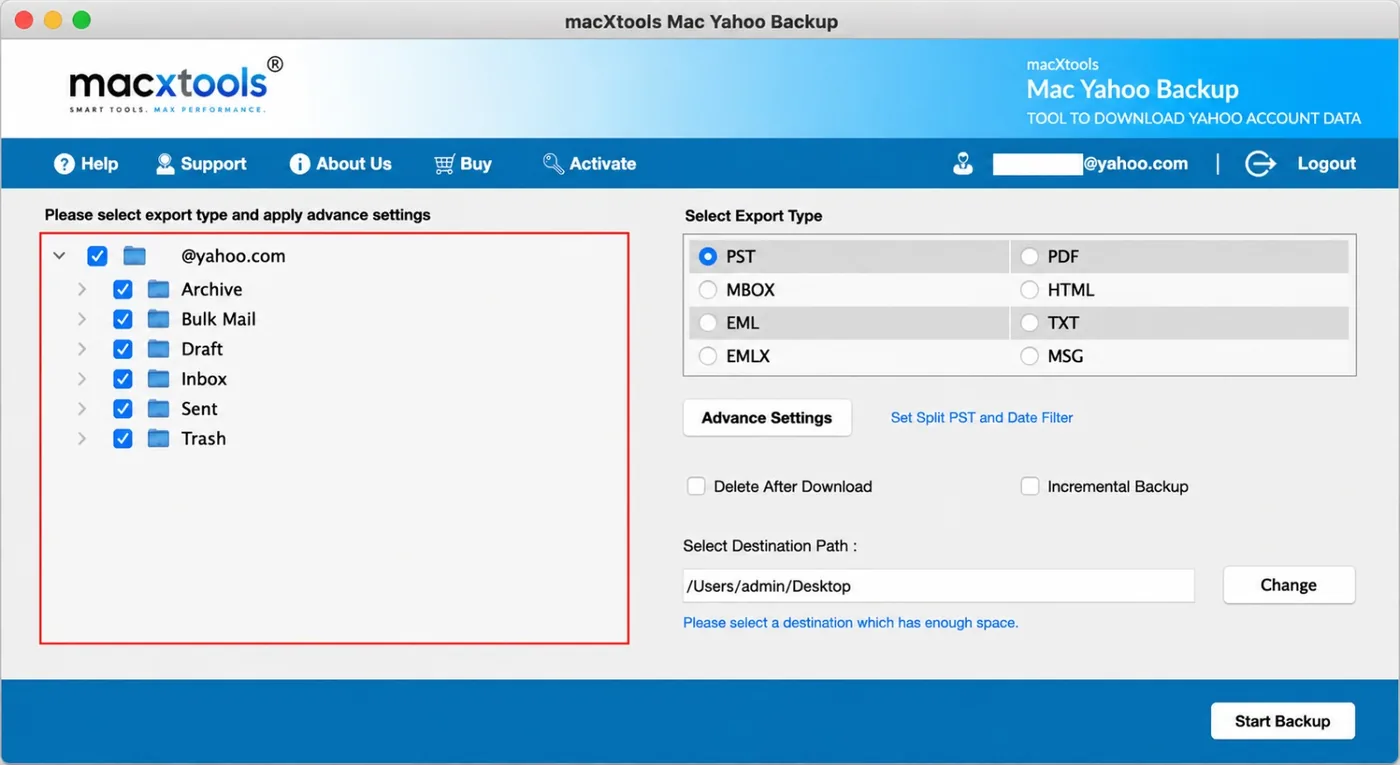
Yahoo backup software lists Archive, Bulk Mail, Draft, Inbox, Sent and Trash. A checkbox sits beside every folder and one more beside the account name, so a single click selects all folders or clears them.
Screenshots
Mac Yahoo Backup Tool Working Steps
Steps to back up a Yahoo Mail account on Mac OS with MacXTools Yahoo backup software.
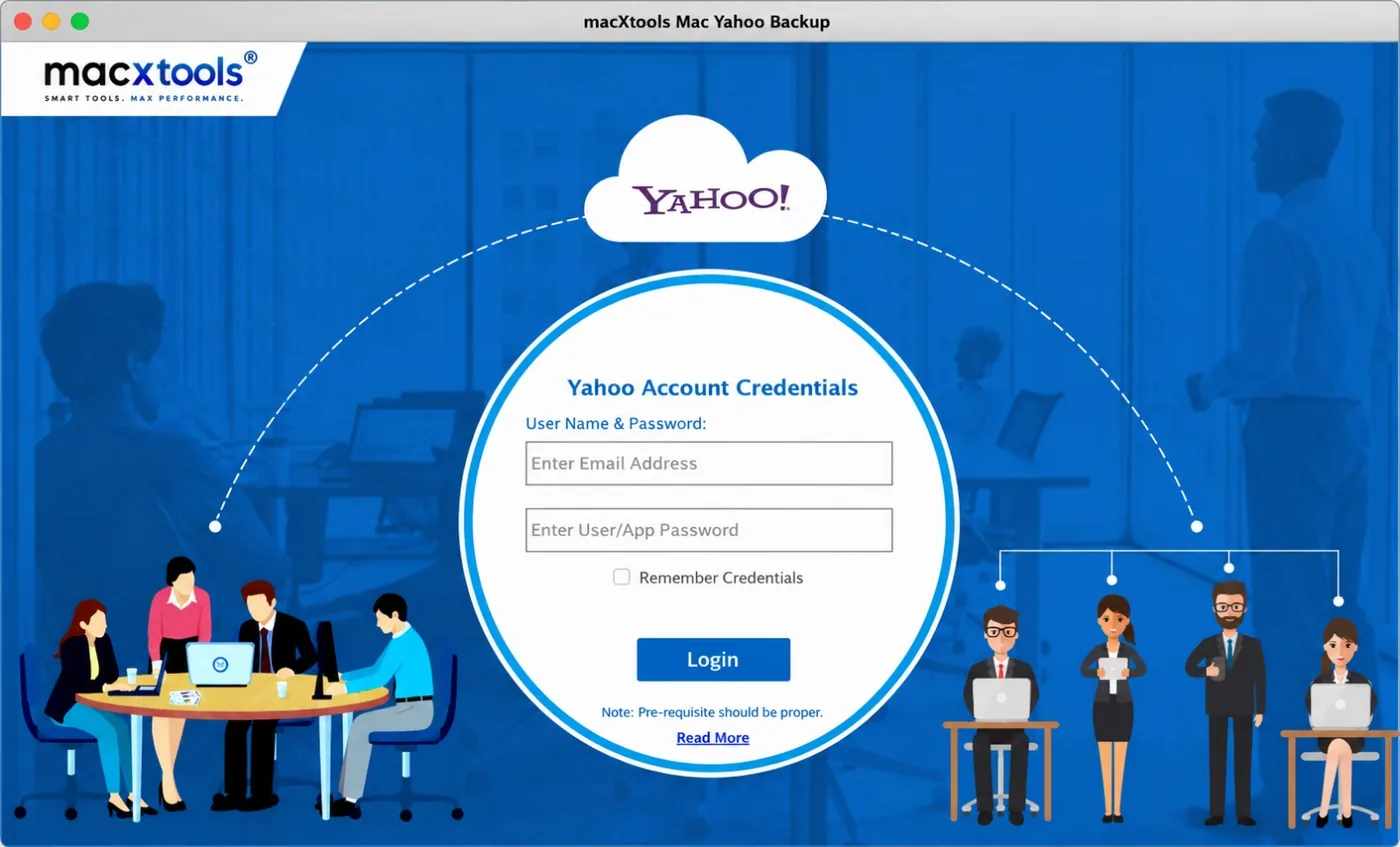
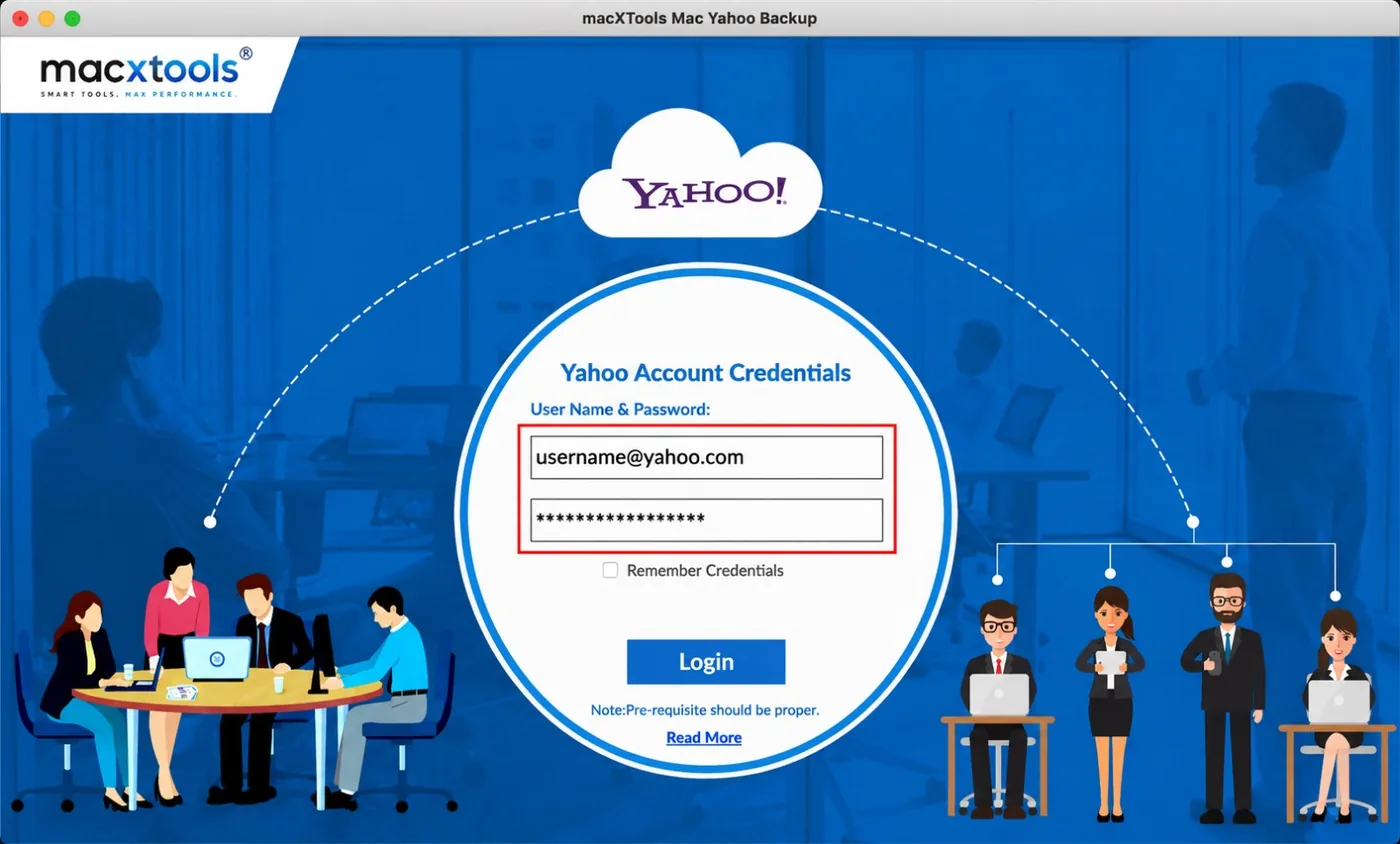
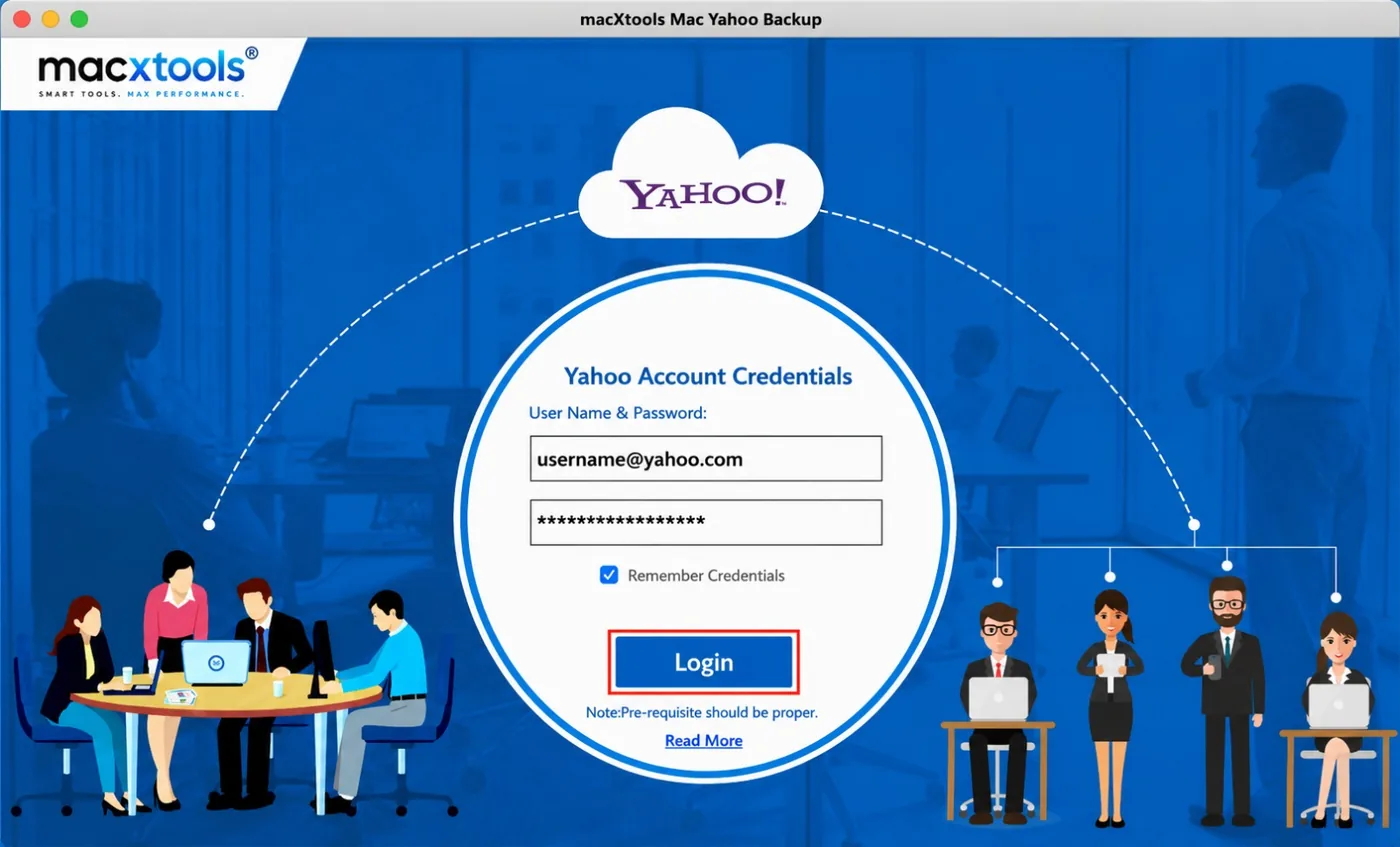
Step-1 The software opens on Yahoo Account Credentials. Enter Email Address and Enter User/App Password are empty, Remember Credentials is unticked and Login waits below.Step-2 The Yahoo email address goes in the first field. The user or app password goes in the second, where the characters stay masked.Step-3Remember Credentials saves the login details for the next session. A click on Login connects the software to the Yahoo account.Step-4 The folder tree and Select Export Type panel open together. Advance Settings, Delete After Download, Incremental Backup, Select Destination Path and Start Backup complete the screen.
Features
Features of Mac Yahoo Backup Tool
Yahoo backup software for Mac covers login, folder selection, saving options and clean-up in one window.
Yahoo Backup App Password
Yahoo backup software logs in with a Yahoo email address and a user or app password. It accepts both password types in one field labelled User/App Password.
Yahoo Backup Folder Selection
Folder tree lists Archive, Bulk Mail, Draft, Inbox, Sent and Trash with a checkbox on every folder. It adds a checkbox on the account too, so one click selects all folders.
Yahoo Backup in 8 Formats
Eight saving options cover mail containers, message files and documents. It includes PST, MBOX, EML, EMLX, MSG, PDF, HTML and TXT.
Incremental Yahoo Backup
Incremental Backup is a single checkbox. It saves only emails received since the last backup, so later backups stay short.
Split PST Yahoo Backup
Set Split PST and Date Filter sits under Advance Settings. It splits PST output into smaller files, with the size set before the backup starts.
Yahoo Backup by Date Range
The date filter limits a backup to emails from selected dates. It shares the Advance Settings panel with the PST split option.
Delete After Yahoo Backup
Delete After Download removes emails from the Yahoo account once the software saves them. It frees mailbox space without a separate clean-up.
Yahoo Backup Destination Path
Select Destination Path opens a folder picker through the Change button. A line below the field asks for a destination with enough free space.
Saved Yahoo Backup Login
Remember Credentials keeps the login details for the next session. Logout in the top bar ends the session when the backup is done.
Advance Settings
Controls in Yahoo Backup Software
Yahoo backup software keeps login and backup settings on two screens.
Yahoo Backup Login Screen
Mac Yahoo Backup Tool connects to Yahoo Mail through four controls on the first screen.
Enter Email Address: takes the Yahoo email address.
Enter User/App Password: takes the user or app password and masks it.
Remember Credentials: keeps the details for the next session.
Login: connects the software to the Yahoo account.
Yahoo Backup Export Settings
The second screen sets what the software saves and where it saves it.
Scope of the Yahoo backup software, stated before purchase.
Yahoo Backup Keeps Folder Structure
Yahoo backup software saves the selected folders as they appear in the folder tree. Archive, Inbox, Sent and the other folders stay separate in the output.
Yahoo Backup Keeps Attachments
Attachments travel with the messages they belong to. The software saves message details along with them.
Yahoo Backup Lacks Contacts
The folder tree lists mail folders only. Yahoo contacts and calendars are not part of the backup.
Yahoo Backup Saves Files to Disk
Output lands in the folder set through Select Destination Path. The software needs enough free space there before Start Backup.
Try Mac Yahoo Backup Tool Free
The free trial saves 100 emails. That is enough to test login, folder selection and the chosen saving option before purchasing the full version.
Saving Yahoo emails by hand works for a few messages. A backup tool suits a full mailbox.
Task
Manual saving
Backup tool
Folders
Open and save messages one at a time
Folder tree with a checkbox on every folder
Output
Whatever the browser or mail app saves
8 saving options
Repeat backups
Start again from the first message
Incremental Backup option
Large mailboxes
No size control
Split PST option
Clean-up
Delete messages by hand inside Yahoo
Delete After Download option
Users
Who Uses Mac Yahoo Backup Tool
What every user group needs from Yahoo backup software for Mac.
Mac Owners Leaving Yahoo
A local archive keeps old emails after the Yahoo account closes. PST or MBOX output opens in the new email client.
Small Business Owners
Customer emails stay on a Mac the business controls. Incremental Backup adds only new mail at every later backup.
IT Administrators
Folder selection and a date filter keep backups to the mail that matters. Split PST keeps output files at a workable size.
Legal and Compliance Teams
PDF output gives emails a fixed layout for records and review. Folder structure stays visible in the saved files.
Archivists and Researchers
TXT and HTML output suits search and reading without an email client.
Users with Full Mailboxes
Delete After Download frees Yahoo mailbox space once the emails are saved to the Mac.
Use Cases
When to Use Mac Yahoo Backup Tool
Yahoo Backup Before Closing an Account
Emails on a closed Yahoo account are gone. The software saves the folders first, so receipts, contracts and old threads stay on the Mac.
Yahoo Backup for Apple Mail
MBOX and EMLX output suits a move into Apple Mail. What Is an MBOX File explains the format and the Mac apps that use it. MBOX Converter for Mac handles later conversions of the saved files.
Yahoo Backup for Legal Review
PDF output converts Yahoo emails into fixed pages for review, audits and records. The date filter limits the backup to the period under review.
Yahoo Backup to Free Mailbox Space
A mailbox near its limit needs older mail out of Yahoo. Delete After Download saves the emails to the Mac first and removes them from the account after.
Why a Local Copy Matters
Yahoo Mail lives on Yahoo servers. A local archive made with Yahoo backup software stays on the Mac when an account closes, a password is lost or a mailbox fills. For background on how email accounts store mail locally, see IMAP and POP on a Mac.
Backup Steps
Back Up Yahoo Mail in Three Steps
Log In to Yahoo Backup
Enter the Yahoo email address and the user or app password on the login screen, then click Login. Remember Credentials is optional.
Set Yahoo Backup Options
Mac Yahoo Backup Tool shows the folder tree after login. Select the folders to save, then select one of eight saving options. Advance Settings holds the split PST and date filter. Delete After Download and Incremental Backup sit below.
Start Yahoo Backup
Select Destination Path with the Change button, then click Start Backup. The software saves the selected folders to the chosen location.
Before the First Backup
Prepare for Yahoo Backup Tool First Use
Three checks that keep the first Yahoo backup on Mac clean.
01
Keep the App Password Ready
The login screen takes a user or app password. Have it ready before opening the software, with the Yahoo email address beside it.
02
Check Free Disk Space
The software asks for a destination with enough space. Select a folder on a disk that holds the full size of the mailbox.
03
Keep the Mac Online
Emails download from Yahoo during the backup. Keep the Mac connected to the internet and awake until the backup ends.
Specifications
Yahoo Backup Requirements
What Yahoo backup software needs to run.
Name
MacXTools Yahoo Backup
Licence
One time purchase, no subscription
Trial limit
100 emails
Disk space
100 MB free
RAM
4 GB
Processor
Apple Silicon or Intel
Platforms
macOS 12 and later
Source
Yahoo Mail, through a Yahoo email address and a user or app password
Which folders does the Yahoo backup software save?
It lists Archive, Bulk Mail, Draft, Inbox, Sent and Trash. Any folder can be selected or cleared before the backup starts. One checkbox on the account selects all of them.
Which login does Yahoo backup software need?
A Yahoo email address and a user or app password. Both go on the first screen. Remember Credentials is optional and Logout sits in the top bar once the folder tree opens.
Which saving options does Yahoo backup software offer?
Eight: PST, PDF, MBOX, HTML, EML, TXT, EMLX and MSG. One option is selected per backup.
Does incremental backup download old emails again?
No. Incremental Backup downloads only the emails that arrived since the last backup, so later backups stay short.
Is it safe to use Delete After Download?
Delete After Download removes emails from the Yahoo account once they are saved. Leave it unticked for the first backup. Open the saved files and check them first. Tick the option only after that.
Can the Yahoo backup software split a large PST file?
Yes. Set Split PST and Date Filter sits under Advance Settings. The same panel limits a backup to emails from selected dates.
What does the free trial of the Yahoo backup tool include?
The free trial saves up to 100 emails. The full version removes that limit and costs $49.00 as a one time purchase with a 30 day refund.
Does Yahoo backup software save contacts and calendars?
The folder tree lists mail folders only. Contacts and calendars are not part of the backup.
Which macOS versions does the Yahoo backup tool for Mac support?
macOS 12 and later, on Apple Silicon and Intel Macs.
One hundred emails are enough to confirm two things. The first is that the software logs in to the Yahoo account. The second is that the chosen saving option opens properly at the destination.